How to Translate Douyin Videos and Live Streams in Real Time: Bilingual Subtitles & Live Interpretation
 Equalang
In brief
Learn how to enable side-by-side bilingual subtitles and real-time live voice interpretation when watching foreign-language short videos and live streams on the Douyin web client.
Keywords: Douyin bilingual subtitles; Douyin real-time translation; Douyin live stream translation; Equalang; real-time audio translation
Whether conducting product research for cross-border e-commerce, benchmarking global competitor accounts, or simply consuming foreign-language content, more and more teams are using the Douyin web client on desktop browsers.
However, the vast majority of original foreign-language short videos on the platform lack Chinese subtitles. Live e-commerce streams and multi-guest collaborations by cross-border creators are also typically unscripted spoken broadcasts without subtitles. When faced with fast-paced foreign speech, capturing key information solely by listening can be challenging.
This article reviews current common solutions and explains step-by-step how to use Equalang on the Douyin web client to enable side-by-side bilingual subtitles for original videos and real-time live stream interpretation.
Objective Comparison of Common Solutions
When dealing with foreign-language video content on the web, there are three primary approaches currently available:
1. Native Platform Auto-Captions
- Mechanism: Relies on creators enabling the platform's built-in speech recognition when publishing videos or uploading external subtitle files.
- Best suited for: Videos specifically localized by creators for Chinese audiences.
- Limitations: Most original foreign-language short videos on Douyin do not have subtitle tracks enabled. Even when subtitles are present, they are usually single-line, single-language captions, making it difficult to view the original speech alongside translations. Moreover, native bilingual subtitles are almost never available in live streaming scenarios.
2. Traditional Full-Page Web Translation Extensions
- Mechanism: Replaces DOM node content by parsing static text on the webpage.
- Best suited for: Translating static text like video titles, post descriptions, hashtags, profile bios, and comments.
- Limitations: Cannot access the media audio stream inside the video player, making audio translation or dynamic subtitle rendering impossible.
3. Real-Time Audio Translation Extensions (e.g., Equalang)
- Mechanism: Captures the playing audio via a browser extension, performs speech recognition and translation, and generates bilingual subtitles directly on the video player.
- Best suited for: Uncaptioned original short videos, international creator co-hosts/guest streams, and real-time cross-border live shopping.
- Limitations: Requires relatively clear vocal input; overly loud background music (BGM) or excessive background noise can impair recognition accuracy.
Hands-On Guide: Bilingual Subtitles for Feed Videos
Taking the Equalang browser extension as an example, here is how to enable bilingual subtitles for original foreign-language audio on Douyin for web.
When browsing foreign-language short videos on Douyin's web version in a desktop browser, the extension automatically offers real-time audio translation whenever it detects that no subtitles are present.
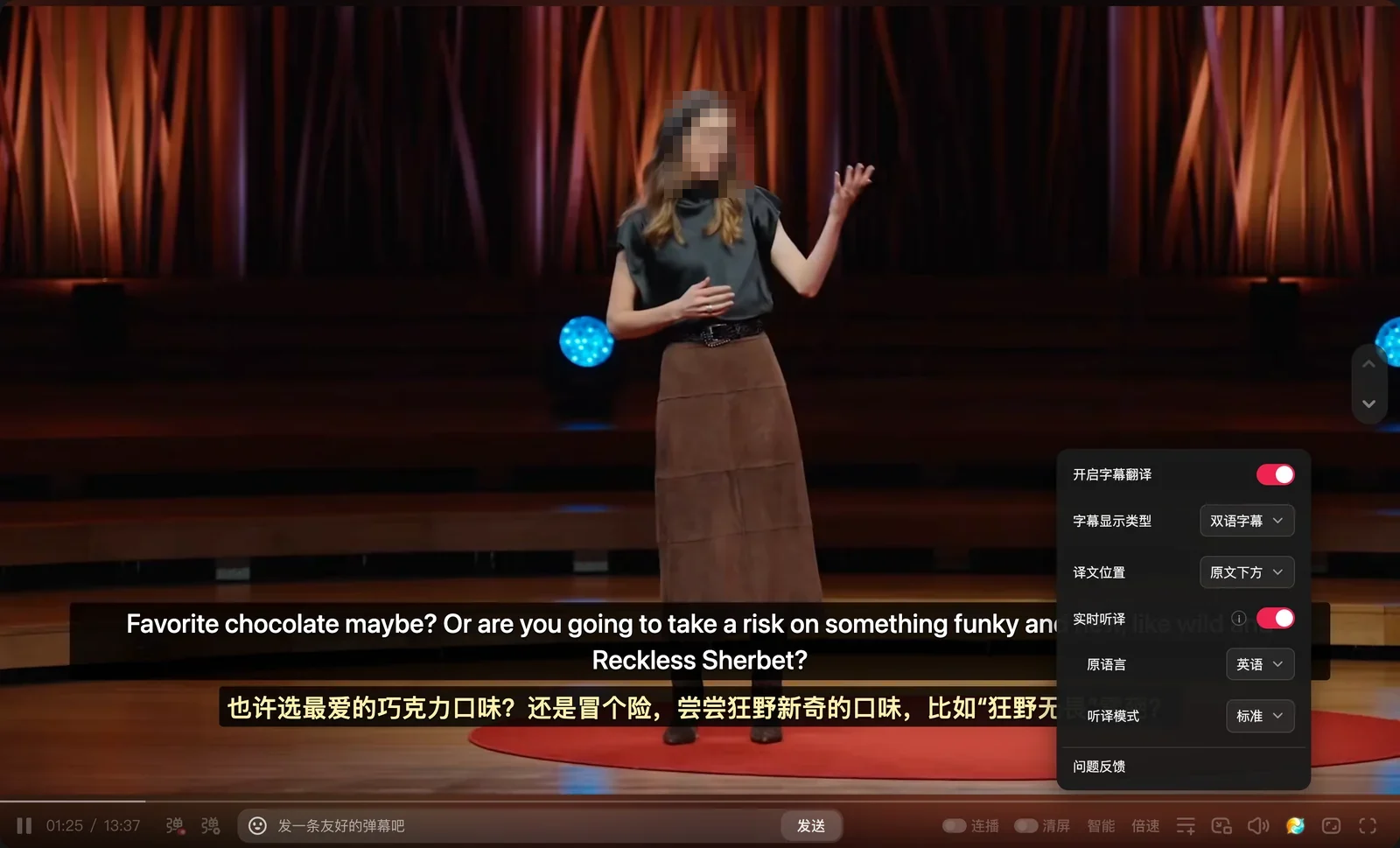
We tested this workflow by opening an uncaptioned English speech video on Douyin's web client. Upon loading the page, the extension detected that the video had no subtitles and displayed a prompt: 'No subtitles detected; real-time audio translation automatically enabled.' We then clicked 'Unmute' on the Douyin player. After selecting 'English' as the Source Language and 'Standard' as the Translation Mode, bilingual subtitles immediately appeared over the video player—English original on top and Chinese translation below:

Key Settings and Display Options
After opening the extension's control panel, you can customize settings to fit your viewing preferences:
- Enable Subtitle Translation and Real-Time Audio Translation: Turn on the main extension switch. When a video lacks native subtitles, toggle on 'Real-Time Audio Translation', then select the appropriate Source Language (e.g., English) and Translation Mode (e.g., Standard).
- Subtitle Display Type:
- Bilingual Subtitles: Displays both the original foreign-language audio transcript and the translation, making it easy to cross-reference specialized terminology and authentic phrasing;
- Translation Only: Displays only the translation, ideal for quickly scanning video content.
- Translation Position: Switch between 'Below Original' and 'Above Original' in the panel to optimize line of sight based on the video layout.
Real-Time Voice Interpretation in Live Streams
Beyond standard short videos, Douyin Live is also officially listed among the supported platforms on the Equalang website.
When watching foreign-language live streams, streamers often speak rapidly and continuously without breaks. With Real-Time Audio Translation enabled, the extension captures and translates the live stream audio in real time, generating bilingual subtitles directly over the video stream to help cross-border operators stay on top of the live content.
Limitations and Practical Tips
When using real-time audio translation, keep in mind the following practical considerations and limitations:
- No need to unmute the video: Due to modern browser autoplay policies, videos may initially play muted upon opening the page. Real-time audio translation functions properly even during muted autoplay.
- Vocal clarity affects recognition accuracy: Real-time translation requires a relatively clear vocal signal. If background music (BGM) or sound effects are too loud, or if multiple speakers talk over each other with heavy ambient noise, recognition accuracy may degrade.
- Streaming segmentation and punctuation: Real-time translation processes incoming audio in dynamic chunks. Subtitle segmentation is determined primarily by natural pauses in speech. Temporary punctuation may appear at the end of clauses and update dynamically as speech continues.
- Protected media restrictions: Copyright-protected encrypted streams (DRM) are restricted by browser security policies; their audio streams cannot be extracted, so real-time audio translation cannot be applied.
Sources
- Douyin Official Web Version: https://www.douyin.com/
- Equalang Browser Extension: https://equalang.com/extension