DeepL vs Google Translate: Which Is Better in 2026?
 Equalang
In brief
Compare DeepL and Google Translate across language support, document translation, free limits, privacy, and pricing to find the right tool for your work.
Keywords: deepl vs google translate; machine translation comparison; deepl free limits; google translate document limits; translation privacy
Google Translate is better if you need broad language coverage (almost 250 languages compared to DeepL's 114), generous free character allowances, free web document translation up to 10 MB, or mobile travel tools like instant camera translation and live spoken conversation. DeepL is better if your work focuses on European languages, Japanese, or Chinese, where you need natural phrasing, formal or informal tone control, custom glossaries, and support for professional file formats like DOCX, PPTX, and XLSX on paid plans.
Neither tool wins across every scenario. Here is how their features, limits, pricing, and data policies compare based on verified specifications.
Quick Comparison: DeepL vs Google Translate
Language Coverage: Broad Reach vs Deep European Focus
The most obvious difference is the language catalog.
Google Translate supports "almost 250 languages" and over 60,000 potential language pairs, serving more than 1 billion users each month according to Google. In 2024 alone, Google added 110 languages using its PaLM 2 model, bringing extensive support for regional dialects, indigenous languages, and smaller linguistic communities across Africa, Asia, and the Americas.
DeepL Translator lists 114 languages in its official help-center directory (its marketing pages state "into over 100 languages"). DeepL concentrates heavily on major world trading languages, particularly European languages alongside Japanese, Chinese, Korean, Indonesian, and Arabic. However, DeepL explicitly notes that not all 114 languages support advanced features such as glossaries, alternative phrasings, or formality adjustment.
Google Translate covers roughly twice as many languages as DeepL, making it often the only option between the two.
Free-Tier Limits: What You Can Actually Do Without Paying
Both platforms offer free access, but their restrictions target different user behaviors.
DeepL Free Tier
- Text translation: A free DeepL account grants 50,000 characters per user per month. DeepL does not officially document a per-request limit for anonymous web translations.
- Document translation: Limited to 1 file per user per month, with a maximum file size of 5 MB. Supported formats for free accounts are Word (.docx/.doc), PowerPoint (.pptx), PDF, RTF (all capped at 100,000 characters), and images (.png, .jpg up to 3 MB).
- Crucial limitation: DeepL states that if you have an account without a paid subscription, your translated files will not be editable. Formats like Excel (.xlsx), TXT, HTML, and SRT are completely unavailable to free accounts.
- Excluded features: Formality selection, full-page web translation, and data protection ("No data training") are excluded from the free tier.
Google Translate Free Tier
- Text translation: You can translate up to 5,000 characters at a time when pasting text into the web or app interface. Google does not publish an aggregate monthly cap for consumer web paste.
- Document translation: Google Translate translates files up to 10 MB on the web at no cost. Accepted formats include .docx, .pdf, .pptx, and .xlsx. PDF files can contain up to 300 pages.
- Crucial limitation: Document translation is not available on mobile browsers or smaller screens. Furthermore, text embedded inside images and scanned PDF pages is retained in the output document but is not translated. Website translation is also restricted in certain geographic regions.
Document Translation and File Formats
If your primary task is translating reports, slide decks, or spreadsheets, file support determines which tool fits your workflow.
Google Translate handles four common office formats (.docx, .pdf, .pptx, .xlsx) directly in the browser for free. The output file is downloadable and retains basic text layout, but Google does not process OCR on scanned PDFs, and complex table borders or layered graphic callouts can shift during rendering. For larger workloads, Google directs users to its developer-focused Cloud Translation API ($0.08 per page for DOCX, PPT, and PDF).
DeepL reserves its complete document translation toolkit for paid Pro subscribers. Paid plans (such as DeepL Pro Individual, Team, or Business) unlock:
- File formats: Word, PowerPoint, Excel (.xlsx), PDF, TXT, HTML, XLIFF, SRT, PNG, JPG, IDML, XML, JSON, MIF, DITA, RTF, YAML, Java .properties, and Markdown.
- Higher limits: Pro Individual allows files up to 30 MB and 1 million characters, with 3 editable file translations per month. Team plans include 20 files per user per month, and Business plans include 100 files per month.
For localization professionals working with technical formats like XLIFF, SRT, IDML, or Markdown, DeepL Pro integrates into standard translation environments, whereas consumer Google Translate does not accept these formats.
Verifying Documents: When One-Way Translation Is Not Enough
A practical challenge with both DeepL and Google Translate is document verification. When either tool outputs a translated Word or PDF document, it generates a single target-language file. If a number, contractual term, or technical parameter looks questionable, you must manually open the original file alongside the translated document and search for the corresponding passage.
When reviewing contracts, financial statements, or academic literature, working in a bilingual interface reduces cross-checking errors. Below, we demonstrate this workflow using Equalang:
- Upload the source document (such as a multi-column PDF, DOCX, PPTX, or XLSX file) to Equalang.
- Once processed, open the file in the translation workspace. The original document is pinned on the left and the translated document on the right.
- Turn on synchronized scrolling. As you scroll through the translated clauses, the source text moves in parallel, allowing immediate verification of figures, citations, and formulas.
- Export either the clean translation file or an alternating bilingual reference document, where odd pages show the source and even pages show the translated text.
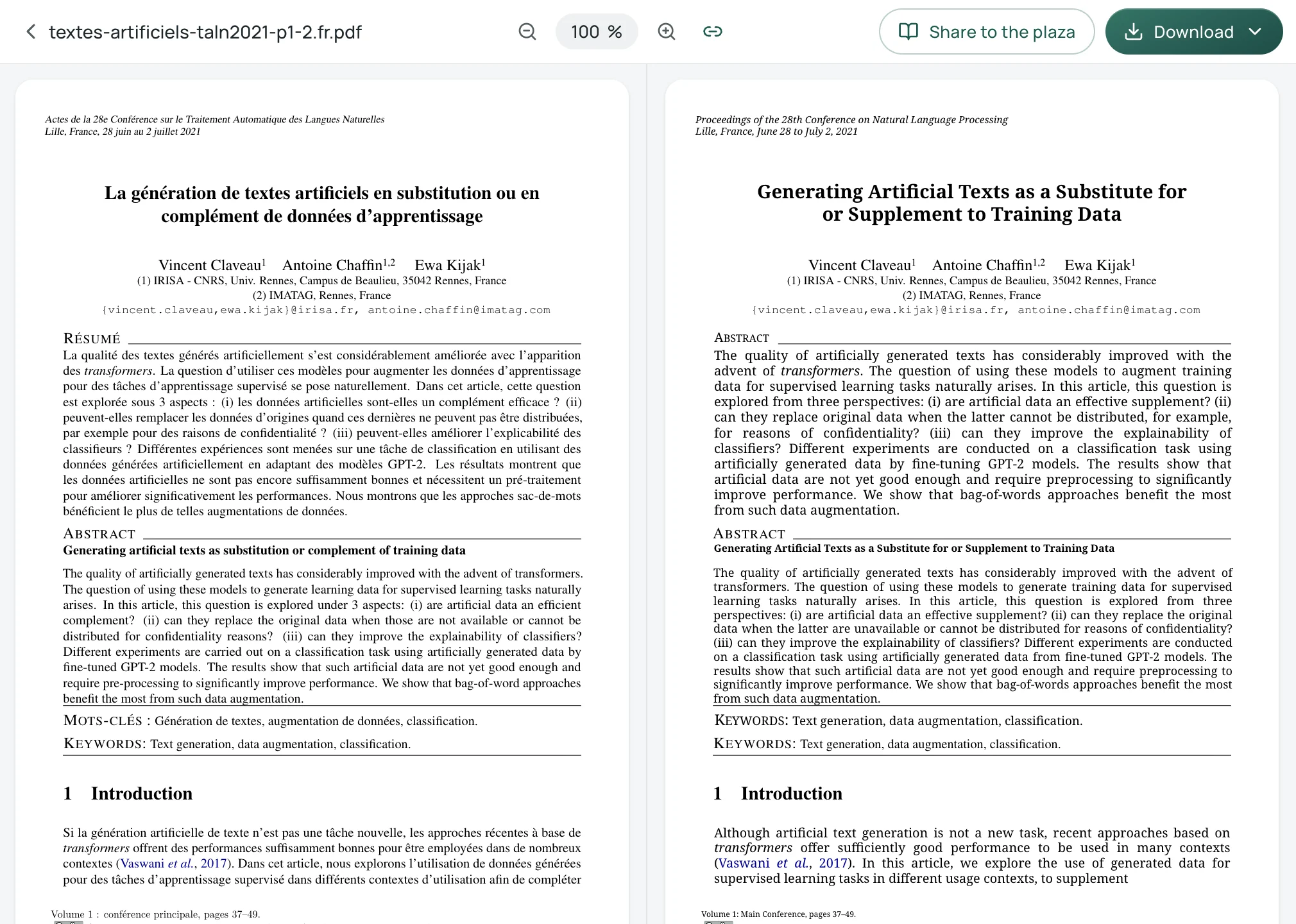
If you prefer not to use an online workspace, an alternative manual workflow is opening both the source and target files side-by-side in a split-window PDF reader (such as Adobe Acrobat or Preview) and navigating manually.
Tone, Formality, and Custom Glossaries
In business correspondence, legal drafting, and client communication, tone consistency is critical.
DeepL provides a dedicated Formality feature for Pro subscribers. It allows users to switch between formal and informal modes in 10 languages: Dutch, French, German, Italian, Japanese (polite vs. plain tone), Polish, Portuguese (Portugal and Brazil), Russian, Spanish, and Vietnamese. For instance, in German correspondence, it reliably enforces Sie over du, preventing awkward shifts in social distance.
DeepL also includes custom glossaries to enforce company-specific terminology:
- Free account: 1 glossary, capped at 5 entries per language pair.
- Pro Individual: 1 glossary, capped at 5 entries.
- Pro Team: 5 glossaries, up to 1,000 entries each.
- Pro Business / Enterprise: Unlimited glossaries under fair-use limits.
Consumer Google Translate does not offer formality toggles or glossary management in its web or mobile apps. Users must either manually prompt downstream editing tools or integrate Google's enterprise Cloud Translation API to enforce glossary rules.
Mobile, Voice, and In-Person Communication
For travel, fieldwork, and spoken conversations, Google Translate holds a distinct advantage.
Google Translate's mobile apps (Android and iOS) include:
- Instant Camera Translation: Point the camera at street signs, menus, or receipts to overlay translated text directly onto the real-world scene.
- Bilingual Conversation Mode: Two speakers talk into a single phone; the app identifies the active speaker and reads the translation aloud.
- Offline Languages: Download language packs to translate text and speech without cellular data or Wi-Fi.
- Live Translate with Headphones: Connect any headphones to listen to continuous translation while preserving the speaker's cadence.
DeepL offers mobile apps for Android and iOS, but its feature set is narrower:
- Image translation: Allows translating photos selected from the camera roll, but it does not support Greek or Cyrillic script source languages.
- Voice input: Relies on your smartphone's native operating system dictation rather than a custom speech recognition engine.
- Real-time spoken conversation: DeepL offers "DeepL Voice for Conversations," but this is a separate paid enterprise/business product. Paid DeepL Translator plans include 30 minutes of DeepL Voice per user per month (free and API plans are excluded).
Browsing and Online Video: Reading in Context
When reading foreign research, technical documentation, or news online, copying paragraphs back and forth between browser tabs is inefficient.
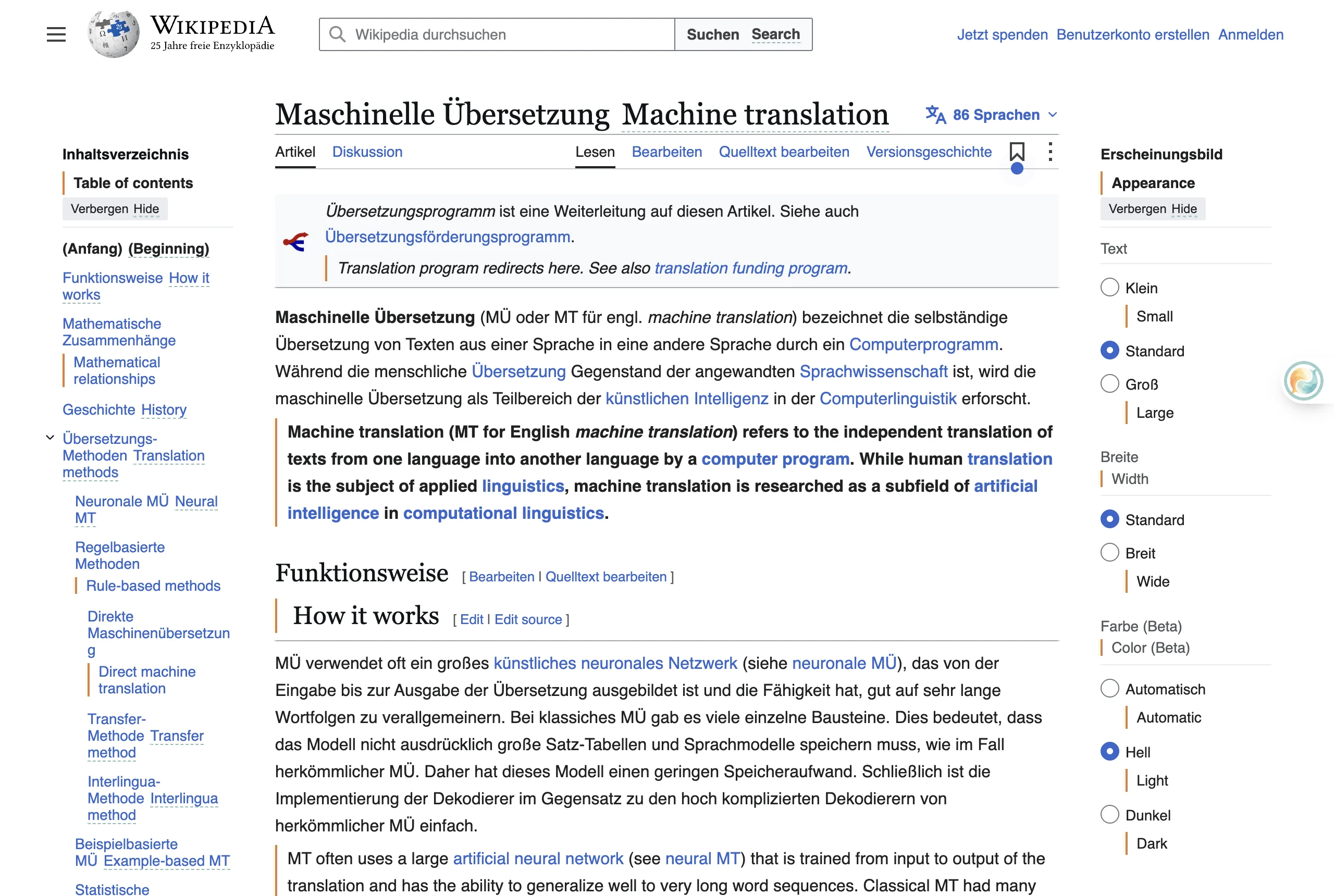
Google provides full-page website translation built directly into Google Chrome, replacing the original page text entirely. DeepL offers browser extensions for Chrome, Edge, and Firefox, enabling full-page translation for paid Pro users and selected text translation for free users.
However, full-page replacement can disrupt technical reading because you lose the original context for specialized jargon. For web reading, extensions like Equalang or Immersive Translate offer an inline bilingual view, inserting translated sentences directly beneath each original paragraph. On recorded video platforms like YouTube and Netflix, Equalang can also render dual-language subtitles simultaneously, allowing language learners and researchers to follow both audio and translation in real time.
Data Privacy and Enterprise Security
Data privacy is often the deciding factor for corporate legal departments and medical researchers.
DeepL Privacy Policy
- Free version: DeepL explicitly states that content uploaded to the free version—including text, files, and user-submitted corrections—is processed and retained for a limited period to train and improve its neural networks and algorithms. The full IP address of free users is stored for up to 14 days.
- DeepL Pro: Pro subscribers receive contractually guaranteed data protection. Original content and translation results are temporarily stored only as technically required to complete the translation and are deleted immediately afterward. They are never used to train DeepL's AI models. DeepL maintains ISO 27001 and SOC 2 Type II certifications.
Google Translate Privacy Policy
- Free consumer service: If you translate text while signed into a Google Account, your translation history syncs to the cloud and is managed under My Activity (if Web & App Activity is enabled). Google's overarching privacy policy states that it uses publicly available information to train AI models, but its official documentation does not explicitly confirm or deny whether text typed into the consumer Google Translate box is used to train models.
For confidential business records, proprietary source code, or personal identification documents, using DeepL Free introduces data-training exposure. DeepL Pro provides a certified closed loop. Similarly, platforms like Equalang state under their privacy terms that user documents and translated text are never used to train AI models and are automatically deleted from servers after 14 days.
Pricing: Subscriptions vs API Usage
DeepL and Google approach monetization through entirely different structures.
DeepL Translator Plans (Region-Dependent)
DeepL uses flat monthly or annual subscription tiers with regional pricing. For example:
- United States (USD):
- Pro Individual: $8.74/month (billed annually) or $10.49/month (billed monthly). Includes 300,000 characters and 3 file translations per month.
- Pro Team: $28.74/user/month (annual) or $34.49/user/month (monthly). Includes 1,000,000 characters and 20 files per user per month.
- Pro Business: $57.49/user/month (annual) or $68.99/user/month (monthly). Includes unlimited characters (fair use) and 100 files per month.
- Germany (EUR, VAT included):
- Pro Individual: €7.49/month (annual) or €8.99/month (monthly).
- Pro Team: €24.99/user/month (annual) or €29.99/user/month (monthly).
- Pro Business: €49.99/user/month (annual) or €59.99/user/month (monthly).
Google Translate Pricing
- Consumer: Free of charge with no consumer subscription upgrade available.
- Developer / Cloud Translation API: Billed per usage. Neural machine translation (NMT) offers the first 500,000 characters free each month ($10 recurring credit), then charges $20.00 per million characters. Document translation (DOCX, PPT, PDF) costs $0.08 per page. Its translation LLM tier costs $10 per million input characters and $10 per million output characters.
Decision Guide: Which Tool Should You Choose?
Use Google Translate if:
- You need to translate languages outside Western Europe and East Asia (e.g., regional dialects, South Asian or African languages).
- You need to translate office documents (.docx, .pdf, .pptx, .xlsx) up to 10 MB or 300 pages for free, and do not mind un-translated scanned images.
- You are traveling abroad and rely on instant camera translation, offline language packs, or two-way spoken conversation.
- You want an entirely free tool for personal use without monthly character caps on text paste.
Use DeepL if:
- You translate business, academic, or literary texts in European languages, Japanese, or Chinese, where nuanced sentence flow is essential.
- You require formal or informal tone control (Sie/du, polite/plain) to adhere to workplace etiquette.
- You manage standard terminology using custom glossaries.
- You subscribe to DeepL Pro to process technical file formats (XLIFF, SRT, Markdown, IDML) and need ISO 27001/SOC 2-certified data privacy that guarantees no model training on your text.
Sources
- DeepL Translator Supported Languages: https://support.deepl.com/hc/en-us/articles/360019925219-DeepL-Translator-languages
- DeepL Document Translation Overview: https://www.deepl.com/en/features/document-translation
- DeepL Pro Pricing and Plans: https://www.deepl.com/en/pro
- DeepL Supported File Formats and Limits: https://support.deepl.com/hc/en-us/articles/360020582359-File-formats
- DeepL Formality Feature: https://support.deepl.com/hc/en-us/articles/4406432463762-About-the-formality-feature
- DeepL Mobile Image Translation: https://support.deepl.com/hc/en-us/articles/4408415322130-Translate-text-from-an-image-in-the-mobile-apps
- DeepL Voice for Conversations: https://support.deepl.com/hc/en-us/articles/16813214348316-About-DeepL-Voice-for-Conversations
- DeepL Privacy Policy: https://www.deepl.com/en/privacy
- Google Translate 20 Years and Language Facts: https://blog.google/products-and-platforms/products/translate/fun-facts-google-translate-20-years/
- Google Translate 110 New Languages (2024): https://blog.google/products-and-platforms/products/translate/google-translate-new-languages-2024/
- Google Translate Help - Text Translation: https://support.google.com/translate/answer/6142478
- Google Translate Help - Document Translation: https://support.google.com/translate/answer/2534559
- Google Cloud Translation API Pricing: https://cloud.google.com/translate/pricing
- Google Privacy Policy: https://policies.google.com/privacy
- Equalang Document Translation: https://equalang.com/documents
- Equalang Browser Extension: https://equalang.com/extension
- Equalang Pricing and Privacy Terms: https://equalang.com/pricing