DeepL Document Translation Limits: File Size and Quotas
 Equalang
In brief
DeepL document translation limits: Free accounts allow 1 file/month up to 5 MB (100k chars). Pro allows 3 to 100 files up to 100 MB. Compare all plan caps.
Keywords: deepl document translation limit; deepl file size limit; deepl pdf translate limit; deepl free document limit; deepl pro file translation
DeepL document translation limits depend directly on your account tier. On a free DeepL account, you can translate 1 file per month, with a maximum file size of 5 MB and a character ceiling of 100,000 characters. In addition, files translated on a free account are locked against editing, and formats like Excel (.xlsx) and plain text (.txt) cannot be uploaded at all.
Subscribing to DeepL Pro raises per-file caps to between 30 MB and 100 MB and 1,000,000 characters, but monthly file allowances remain strictly capped: Pro Individual includes 3 files per month, Pro Team includes 20 files per month, and Pro Business includes 100 files per month.
Here is the exact breakdown of current limits across web, desktop, and API tiers:
1. Per-File Size and Character Limits by Format
DeepL applies two distinct limits to every upload: file size in megabytes and character count. If either threshold is exceeded, the translation fails or the document is only partially translated.
Supported Formats on Free Accounts
On a free account, file translation is limited to:
- Microsoft Word (.docx, .doc): 5 MB / 100,000 characters
- PowerPoint (.pptx): 5 MB / 100,000 characters
- PDF (.pdf): 5 MB / 100,000 characters
- Rich Text Format (.rtf) and OpenDocument Text (.odt): 5 MB / 100,000 characters
- Standalone Images (.png, .jpg): 3 MB (processed during beta without counting toward monthly file limits)
Paid-Only Formats
The following formats cannot be translated on a free DeepL account under any circumstances:
- Excel (.xlsx, .xlsm): 20 MB on Pro Individual and Team; 30 MB on Pro Business (1,000,000 characters).
- Plain Text (.txt): 1 MB / 1,000,000 characters on all Pro plans.
- HTML (.html): 5 MB / 1,000,000 characters on all Pro plans.
- Subtitles (.srt, .vtt): 150 KB to 200 KB / 1,000,000 characters.
- Localization Files: XLIFF, JSON, YAML, Markdown, IDML, and XML require a Pro or API plan.
[!NOTE] Images embedded inside Word documents, PowerPoint slides, or PDF files are not translated by DeepL. Only standalone JPG and PNG uploads undergo text extraction and in-image translation.
2. Monthly File Quotas and Rollover Rules
The most common surprise for users upgrading to DeepL Pro is the monthly file count limit. A Pro subscription does not provide unlimited document translations:
- Strict per-user caps: Pro Individual grants only 3 files per month. If you have four 10-page contracts to translate, you will run out of quota on the fourth document. Pro Team offers 20 files per month, and Pro Business offers 100 files per month.
- No rollover: Unused document translation allowances expire at the end of each billing cycle. They do not roll over to the next month.
- Purchasing extra files: Only Team and Business plans allow administrators to buy add-on file translation packages. Individual subscribers cannot add file capacity without changing plans.
- API and Enterprise differences: The DeepL API and DeepL for Enterprise do not enforce a fixed monthly file count limit. Instead, every translated document is billed individually based on character volume (with a 50,000-character minimum charge per document for formats like PDF, Word, and Excel).
3. Editing Restrictions, Protected Files, and Scanned PDFs
Beyond file size and monthly caps, DeepL enforces structural restrictions depending on your account status:
The Free-Tier Edit Lock
DeepL's documentation explicitly confirms: "If you have a DeepL account without a DeepL subscription, your translated files will not be editable." When downloading a translated Word document from a free account, the file is delivered with document protection enabled, preventing you from revising phrasing, tweaking layouts, or copying text freely without workarounds.
PDF-to-Word Conversion Gate
If you upload a PDF, DeepL allows you to download the translated version as a PDF across all tiers. However, downloading the translated PDF as an editable Word document (.docx) is plan-gated: DeepL requires Pro Team, Pro Business, or legacy Advanced/Ultimate plans. Pro Individual is not listed as supporting PDF-to-DOCX export.
Scanned Documents and Layout Handling
- OCR Engine: DeepL extracts text from scanned PDFs using optical character recognition, recommending a minimum scan resolution of 300 DPI.
- Accuracy Variations: Dense multi-column layouts, custom fonts, or skewed scans carry a higher error rate.
- Unsupported PDF types: PDFs exported from CAD software (such as architectural floor plans or engineering blueprints) are not supported.
4. What Happens When a File Exceeds DeepL's Limits?
When an upload exceeds DeepL's parameters, the platform typically displays an error stating that the file exceeds supported limits, or it produces a truncated document where text beyond the character threshold is left blank. On API endpoints, oversized payloads return HTTP 413 (Payload Too Large), and exhausted character quotas trigger HTTP 456 (Quota Exceeded).
If a document fails to download after processing but still consumes one of your monthly file credits, DeepL's official guidance is to open a ticket with DeepL Support to request a credit restoration.
5. Workarounds and Alternative Document Workflows
If your documents exceed 5 MB, surpass 100,000 characters, or if you regularly process more than 3 documents a month, consider three practical approaches:
Approach 1: Manual File Splitting
For large PDFs, you can use local PDF tools to split a 50-page document into five 10-page segments under 5 MB each. While effective for simple text, splitting breaks page-spanning sentences, fragments cross-references, and exhausts your monthly file count rapidly on DeepL (a 5-part split immediately consumes 5 file credits).
Approach 2: Upgrading to DeepL Pro
Upgrading makes sense if your workflow fits within DeepL's volume caps (e.g., 20 files per month on Team) and you primarily require European language pairs. Ensure you budget for Team or Business if you need editable DOCX downloads from PDFs.
Approach 3: Alternative Document Translators Without Monthly File Caps
When evaluating other options, consider each platform's trade-offs:
- Google Translate Document Tool: Free and accepts files up to 10 MB, supporting Word, PDF, and Excel. However, it often strips document formatting, reflows tables unpredictably, and offers no side-by-side editing interface.
- Microsoft Word Built-in Translator: Convenient for quick drafts inside Office 365, but struggles with multi-column PDFs and does not handle bilingual side-by-side verification.
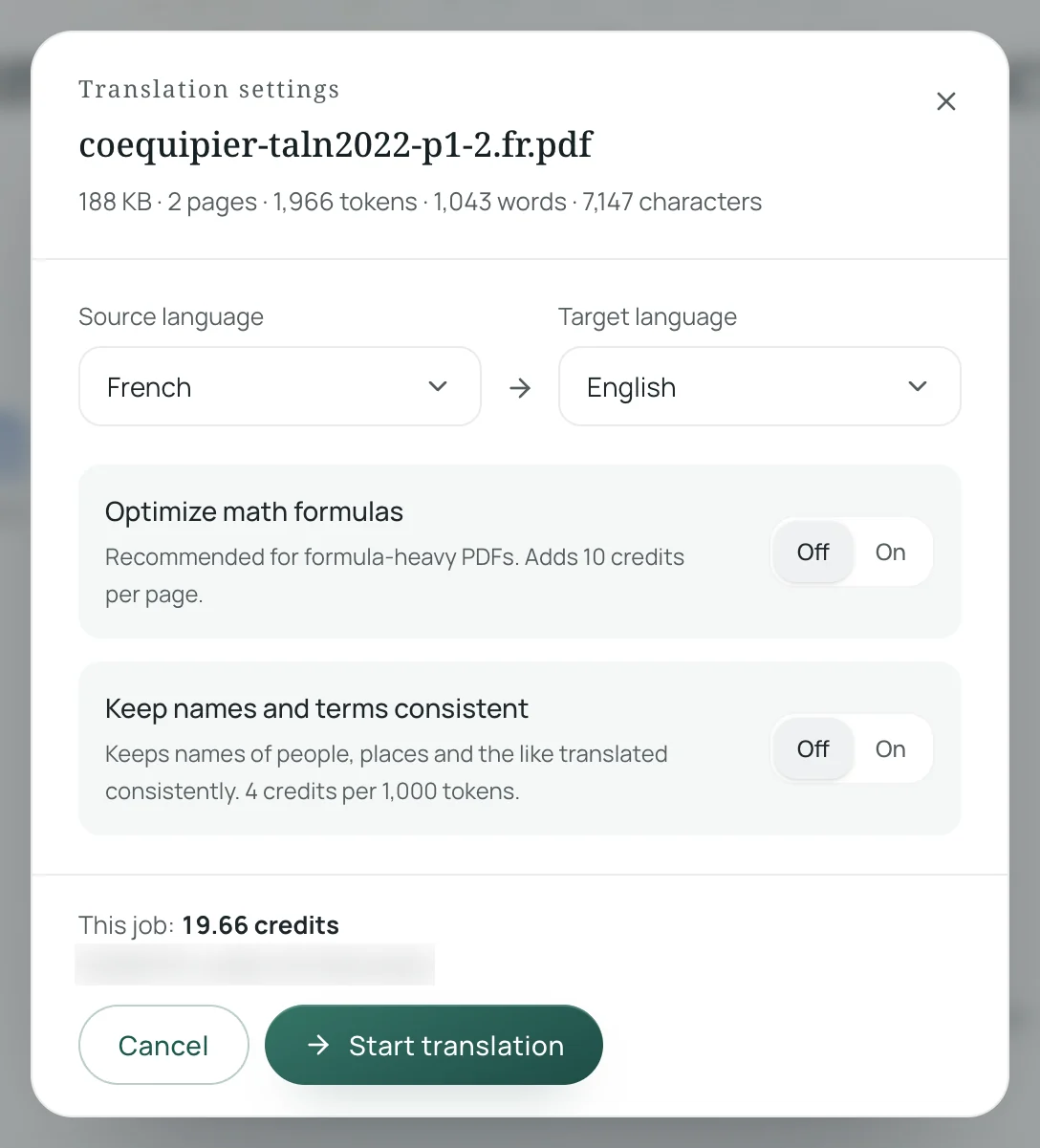
Here is how to translate with Equalang (equalang.com/documents), an AI-powered document translator designed to handle whole files with layout preservation:
- Select your file format: Equalang accepts PDF, DOCX, PPTX, XLSX, EPUB, HTML, and TXT files. Unlike tiered monthly caps, files on the web interface are submitted individually with no monthly file count limit. An account can process up to 3 documents simultaneously, while any additional files queue automatically.
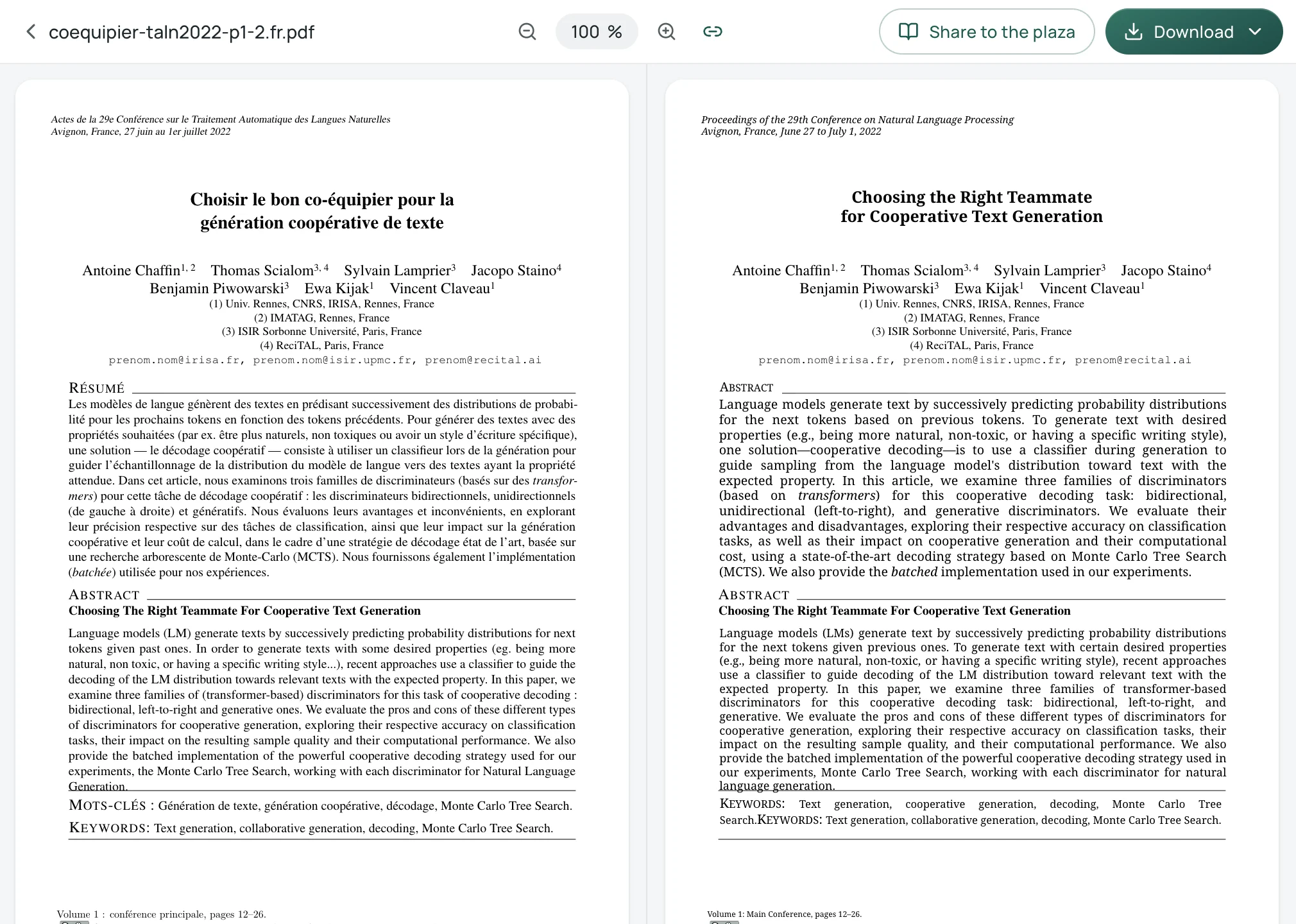
- Preserve complex structures: Equalang reconstructs multi-column academic layouts, keeps mathematical formulas intact, and restructures merged table headers. In spreadsheets (.xlsx), formulas, numeric values, and sheet names remain functional, translating only text cells while charging duplicate entries once. Sentences split across page boundaries are rejoined before translation.
-
Review in the side-by-side workspace: Once translated, you can open your document in the Equalang translation workspace, which places the original text on the left and the translation on the right with synchronized scrolling. You can download the translated file directly or export a dual-page reference document (alternating original and translated pages for bilingual reading).
-
Privacy and data retention: Uploaded files and translation outputs are stored securely for 14 days and then permanently deleted. Equalang does not sell personal data or use submitted files to train AI models.
If you handle technical manuals, research papers, or financial spreadsheets that exceed strict character walls, exploring specialized tools like Equalang can help you avoid workflow interruptions.
Sources
- DeepL Help Center, "File formats" (updated 2026-11-09): https://support.deepl.com/hc/en-us/articles/360020582359-File-formats
- DeepL Help Center, "About file translation" (updated 2026-11-06): https://support.deepl.com/hc/en-us/articles/360020582499-About-file-translation
- DeepL Pricing Page: https://www.deepl.com/en/pro
- DeepL Help Center, "Translate PDF files": https://support.deepl.com/hc/en-us/articles/4411308018450-Translate-PDF-files
- DeepL Help Center, "Troubleshooting: File translation" (updated 2026-11-10): https://support.deepl.com/hc/en-us/articles/360018880579-Troubleshooting-File-translation
- DeepL Developer Documentation, "Usage and limits": https://developers.deepl.com/docs/resources/usage-limits
- Equalang Document Translation: equalang.com/documents
- Equalang Pricing: equalang.com/pricing