DeepL Alternatives: Best Free, PDF, and AI Tools (2026)
 Equalang
In brief
Compare the top DeepL alternatives for free text, layout-preserving PDF translation, and LLM nuance. Find the right tool for your specific workflow.
Keywords: DeepL alternatives; free translation tools; PDF document translation; ChatGPT vs DeepL; layout preserving translation; bilingual translation
If you are looking for a DeepL alternative, your best choice depends on which limitation caused you trouble:
- For unlimited free text and broadest language coverage: Google Translate handles almost 250 languages with 5,000 characters per paste on the web.
- For nuanced, context-aware rewriting and tone adjustments: General LLMs like ChatGPT (with its dedicated 72-source-language translation interface) and Claude handle tone and cultural phrasing better than traditional engines, though neither exports a file with original formatting preserved.
- For East Asian business and Korean documents: NAVER Papago offers dedicated terminology glossaries and 20 free monthly documents up to 20 MB.
- For academic PDFs and business documents where formatting must stay intact: Specialized document translation tools like Equalang reconstruct columns, tables, and equations, while Reverso Documents and Lara Translate offer dedicated per-page or per-character tiers.
Here is how each major alternative performs across free limits, document support, formatting preservation, and real-world trade-offs.
1. Free and Everyday Translation: Google Translate & Microsoft Translator
When users search for a "DeepL alternative free," character limits and regional language gaps are usually the main drivers.
Google Translate
Google Translate covers almost 250 languages and more than 60,000 potential language pairs.
- Free limits: Paste up to 5,000 characters at a time on the web. Document translation on desktop web accepts
.docx,.pdf,.pptx, and.xlsxfiles up to 10 MB, with PDFs capped at 300 pages or fewer. - Key capabilities: Camera instant translation, real-time voice conversations, handwriting recognition, and offline language downloads on mobile.
- Trade-offs and boundaries: Document translation is not available on smaller screens or mobile browsers. Google Translate does not translate scanned PDFs or text trapped inside images within documents. Cloud Translation API pricing runs at $20 per million characters after a free 500,000-character monthly credit, with document translation at $0.08 per page.
Microsoft Translator
Microsoft Translator provides 135 language and variant rows in Azure for cloud text and document translation (including regional variants).
- Consumer features: Dedicated Android and iOS apps offer offline language packs and live conversational translation.
- Developer & API tiers: Azure provides a free tier of 2 million characters per month for standard translation and custom translation training. Paid API rates in eastus start at $10 per 1 million characters for standard text, $15 per 1 million characters for document translation, and $40 per 1 million characters for custom translation.
- Trade-offs and boundaries: Microsoft does not publish a standalone free consumer document translation portal with clear file-type specifications on its main landing pages.
2. Large Language Models: ChatGPT vs. Claude
Many users asking "is DeepL better than ChatGPT" are looking for natural phrasing, idiomatic expressions, and stylistic tone rather than literal word-for-word translation.
Where LLMs excel
Both ChatGPT and Claude understand context, irony, specialized academic register, and custom instructions (such as "translate this into casual UK English" or "preserve technical terms in German").
Where LLMs fall short
Neither OpenAI nor Anthropic claims to return a translated document with the original visual layout, column structures, and clickable table of contents preserved.
3. Dedicated Document Translators: Papago, Reverso, and Lara
If you need a dedicated document translation engine that outputs translated files, three options provide structured alternatives to DeepL:
NAVER Papago
Papago specializes in East Asian language pairs (Korean, Japanese, Simplified and Traditional Chinese, and English).
- Free tier: 20 documents per month (up to 20 MB per file), 30 minutes of voice translation, and 1 glossary with up to 10 terms.
- Paid plans: Plus Basic ($9.99/month, 30 docs up to 50 MB), Plus Standard ($29.99/member/month, 70 docs up to 100 MB), and Plus Advanced ($55.99/member/month, 150 docs up to 100 MB).
- Supported document formats: PDF, HWPX, and MS Office.
Reverso Documents
Reverso offers document translation across 29 languages, supporting PDF, Word, PowerPoint, Excel, CSV, HTML, XML, and localization formats like XLIFF and PO.
- Free tier: 2,500 credits (approximately 5 pages), files up to 2.5 MB, no credit card required.
- Paid plans: Premium at €6.49/month (billed annually at €77.88) provides 80,000 credits/year (~200 pages) for files up to 30 MB and PDFs up to 100 pages; Pro at €19.99/month (billed annually at €239.88) provides 300,000 credits/year (~750 pages) for files up to 120 MB and PDFs up to 250 pages.
Lara Translate
Lara positions itself as a professional AI translator supporting over 200 languages and 70+ file formats.
- Pricing: Free tier provides 60,000 monthly characters (minimum 20,000 characters counted per document translation; 10,000 characters per image). Pro costs $9.99/month (billed annually) for 500,000 characters/month and adds scanned PDF support. Team costs $29.99/month (billed annually) for 1,500,000 characters shared across unlimited seats.
- Privacy: Incognito mode ensures content is never stored, logged, or used for model training.
4. Translating Complex PDFs While Keeping Layout Intact
The most common reason people search for a "DeepL alternative for PDF" is layout disruption. When translating dense PDFs, multi-column scientific papers, or presentations, translated text often expands and collides with diagrams, formula symbols get scrambled, or broken page-end sentences fail to translate as complete thoughts.
Below, we illustrate this workflow using Equalang's document translation workspace:
- Upload the file directly: Equalang accepts PDF, DOCX, PPTX, XLSX, EPUB, HTML, TXT, and SRT files. On the web platform, files are uploaded one by one, with up to 3 documents processed concurrently per account.
- Structural reconstruction: The engine recombines sentences split across page breaks before translating, matches bold styling to corresponding translated phrases, and keeps table borders, multi-row headers, and internal hyperlinks functional. For technical PDFs, users can enable formula optimization to prevent inline math from flattening into unreadable characters.
- Side-by-side inspection: Once processing finishes, the document opens in a dual-pane translation workspace with synchronized scrolling.
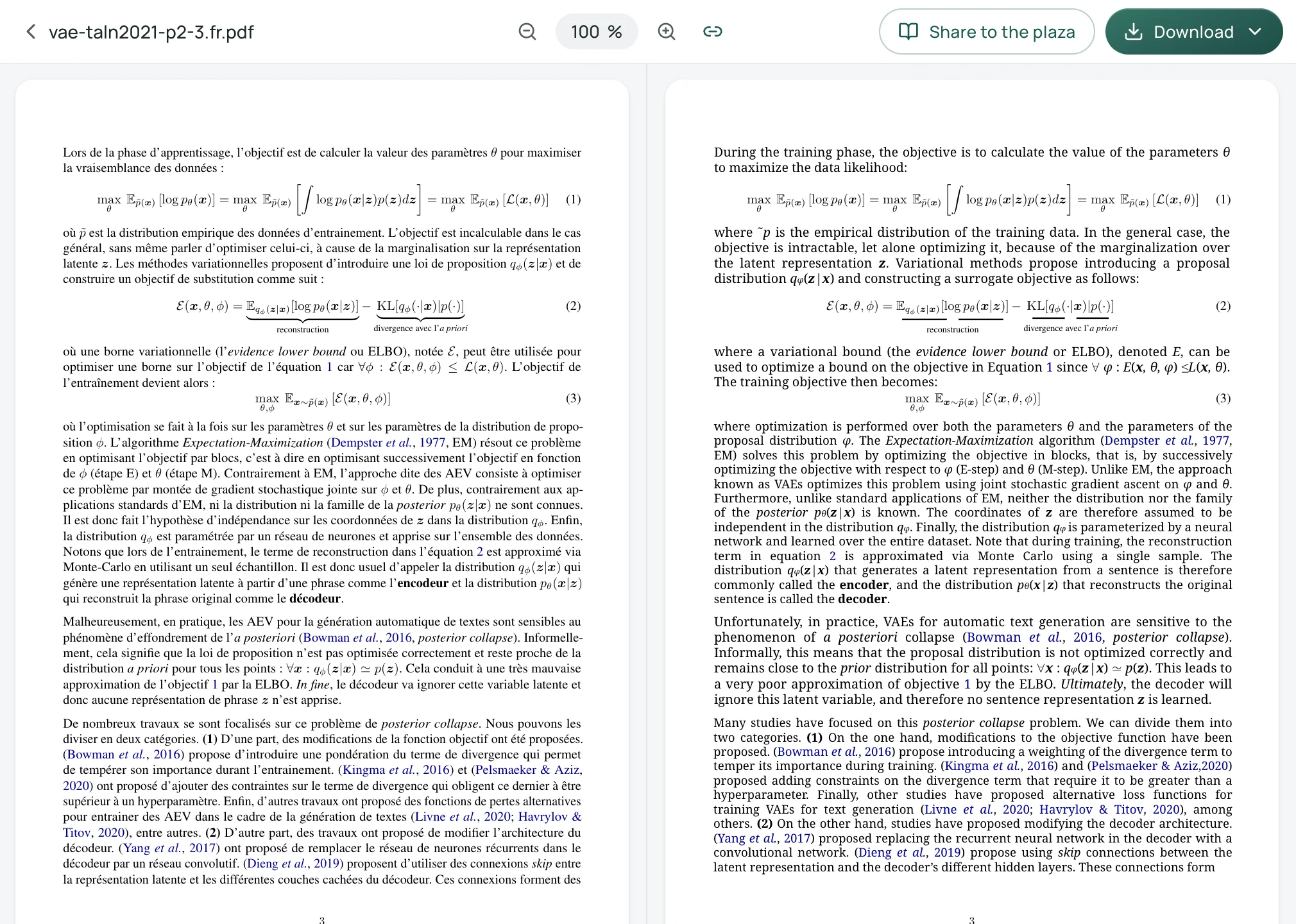
In addition to viewing translations online, users can download the translated file or an alternating-page bilingual PDF. When opened in a desktop PDF viewer set to two-page facing view, the original and translated pages display side by side for line-by-line verification. For academic workflows, readers can also connect via Zotero to translate research papers directly from their reference library.
5. Alternatives for Webpages and Streaming Video
Many users rely on DeepL's desktop integration to read foreign websites or follow multimedia content. However, when working with dynamic webpages or foreign video streams, dedicated browser tooling is often more practical:
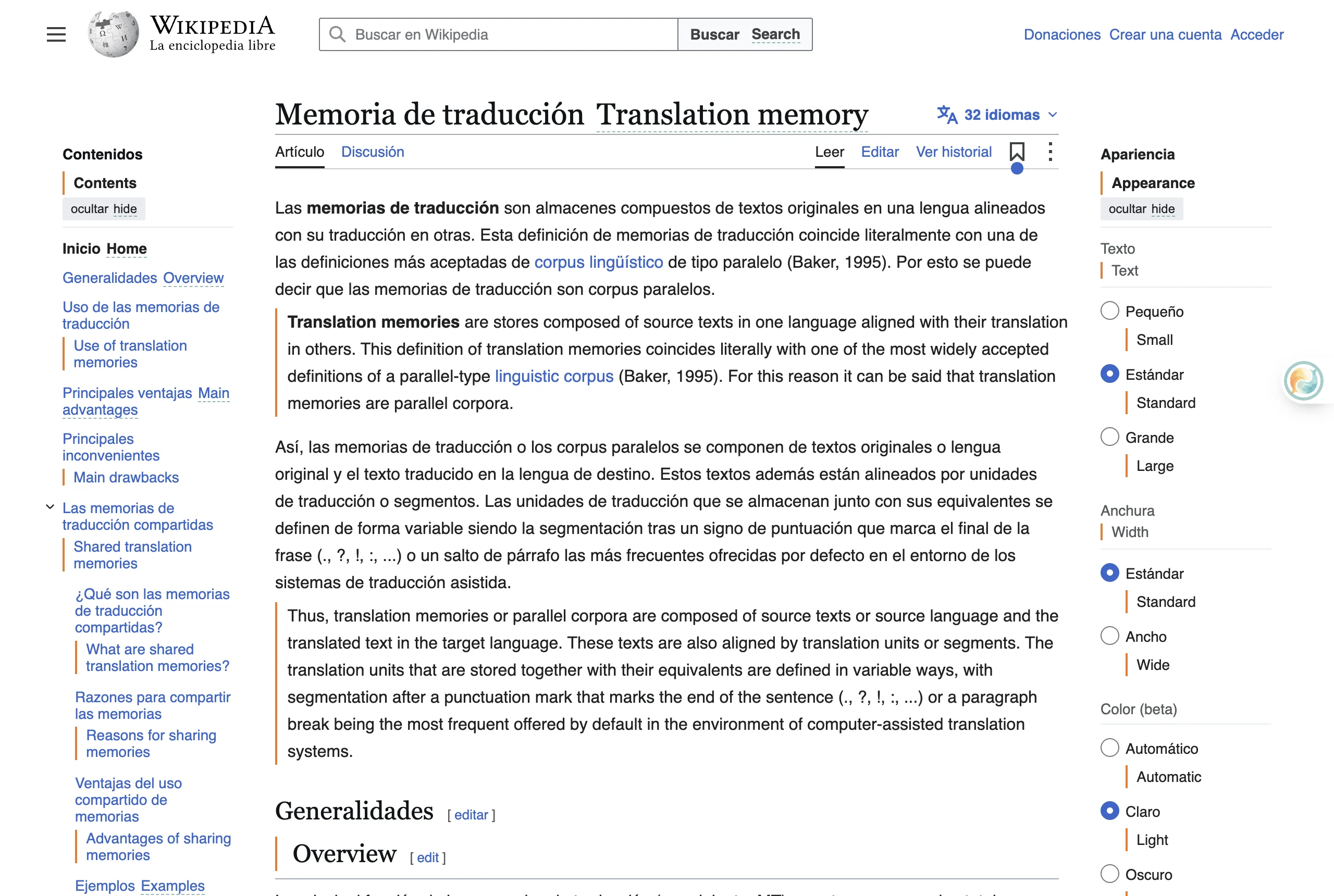
- Bilingual webpage reading: Rather than copying text chunks back and forth into a translator tab, browser extensions provide in-place paragraph-by-paragraph translation. For instance, the Equalang browser extension (available for desktop Chrome, Edge, and Firefox) renders translated sentences directly beneath each source paragraph without disrupting page navigation.
- Dual subtitles on streaming video: For recorded video content on platforms such as YouTube, Netflix, TikTok, and Bilibili, browser-based subtitle tools capture subtitle tracks and display original and translated subtitles simultaneously. Where original subtitles are missing, browser speech recognition tools can generate real-time captions for recorded videos.
6. How to Choose the Right Alternative
Use this quick checklist to match your exact scenario:
- Choose Google Translate if you need free, ad-hoc text translation across rare languages or on mobile devices.
- Choose ChatGPT or Claude if you are drafting correspondence, polishing essays, or adapting marketing copy where human-like tone matters more than file formatting.
- Choose Papago if your primary language pairs involve Korean, Japanese, or HWPX files.
- Choose Equalang if your priority is reading double-column PDFs, slides, or financial tables where visual formatting, equations, and side-by-side verification must remain intact.
- Choose Lara Translate or Reverso Documents if you need structured enterprise character allocations or broad European localization file format support (such as XLIFF).
Sources
- Google Translate 20-Year Milestones: https://blog.google/products-and-platforms/products/translate/fun-facts-google-translate-20-years/
- Google Translate Document Support: https://support.google.com/translate/answer/2534559?hl=en&co=GENIE.Platform%3DDesktop
- Google Cloud Translation Pricing: https://cloud.google.com/translate/pricing
- Microsoft Translator Language Support: https://learn.microsoft.com/en-us/azure/ai-services/translator/language-support
- Azure Translator Pricing: https://azure.microsoft.com/en-us/pricing/details/translator/
- OpenAI ChatGPT Translate: https://chatgpt.com/translate
- OpenAI ChatGPT Pricing: https://chatgpt.com/pricing
- Anthropic Claude Pricing: https://claude.com/pricing
- Anthropic Supported File Formats: https://support.claude.com/en/articles/8241126-what-kinds-of-documents-can-i-upload-to-claude-ai
- NAVER Papago Web: https://papago.naver.com/
- NAVER Papago Plus Pricing: https://papago-plus.com/pricing
- Lara Translate Pricing: https://laratranslate.com/pricing
- Reverso Documents Pricing: https://documents.reverso.net/Pricing.aspx?lang=en
- Equalang Document Translation: https://equalang.com/documents
- Equalang Browser Extension: https://equalang.com/extension
- Equalang Pricing & Privacy: https://equalang.com/pricing , https://equalang.com/legal/privacy