How to Watch Crunchyroll with Chinese Subtitles: Bilingual Subtitle Setup Guide
 Equalang
In brief
When streaming anime on Crunchyroll without Chinese subtitles or when limited to a single language track, you can use subtitle translation to convert the platform’s official subtitles directly into Chinese or enable side-by-side bilingual subtitles on screen.
Keywords: Crunchyroll Chinese subtitles; Crunchyroll bilingual subtitles; anime subtitle translation; Equalang
When watching anime on Crunchyroll, one of the most popular licensed streaming platforms overseas, viewers often run into two issues that directly impact the viewing experience: first, many series only offer official subtitles in languages like English, Spanish, or French, with no Chinese subtitles available. When encountering complex fictional world-building lore, lengthy character monologues, or fast-paced plotlines, relying solely on foreign-language subtitles is both exhausting and makes it easy to miss important details. Second, the player's settings gear only allows you to select one subtitle track at a time. Viewers who want to check the original lines while watching anime—or learn a foreign language along the way—cannot display both languages on the same screen for side-by-side comparison.
The most direct solution is to translate the platform's official subtitles directly into Chinese and display both the original text and the translation on screen simultaneously. Here is a step-by-step walkthrough using the Equalang browser extension:
- Enable the video's built-in subtitles: Open a Crunchyroll episode playback page in a desktop browser (supports Chrome, Edge, and Firefox; Mac users can also temporarily install it on Safari). Click the settings gear (Subtitles/CC) in the bottom-right corner of the player and select any official subtitle track provided by the platform.
- Turn on subtitle translation and select target language: Click the Equalang icon on the player control bar, enable subtitle translation, and set the target language to Chinese (or any other language you prefer).
- Choose display mode and position: In the extension menu, you can set the display mode to "Bilingual" or "Translation Only." If you choose bilingual comparison, you can also adjust whether the translation appears above or below the original subtitles.
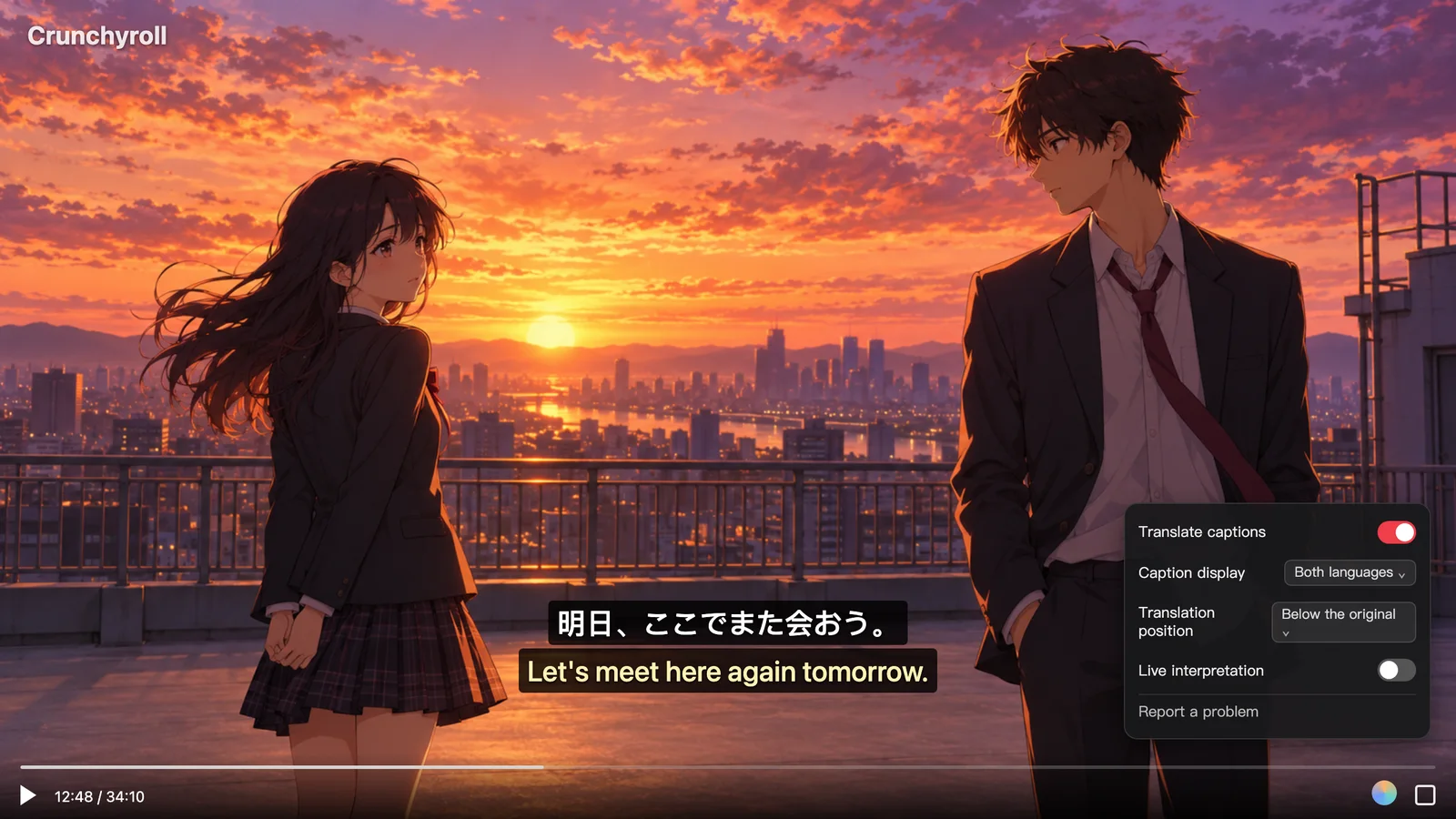
Once enabled, the player translates directly based on your selected built-in subtitle track. When you don't want foreign text distracting you and just want to follow the plot smoothly, switching to "Translation Only" lets you use it like standard Chinese subtitles. When you encounter puns, character-specific forms of address, or want to compare expressions in the original language, switching back to "Bilingual" lets you cross-check context at a glance.
Two Limitations to Know Before You Start
To avoid wasted effort while watching anime, there are two platform-related constraints to keep in mind beforehand:
- Must have platform-provided subtitles first: Streaming on Crunchyroll relies on subtitle translation—meaning it translates the subtitle tracks provided by the platform itself. Which subtitle languages are available for each title depends on the platform's regional licensing and production arrangements, which you will need to check individually in the player's gear menu. If a video has no subtitle tracks to begin with, subtitle translation cannot work.
- Do not rely on live audio translation as a regular solution for Crunchyroll: While Equalang supports live speech-to-text translation on some video sites that lack subtitles by capturing system audio, official episodes on licensed streaming services like Crunchyroll are typically encrypted with DRM protection. Due to browser security restrictions, audio cannot be captured from these protected video streams. Therefore, watching full episodes on Crunchyroll requires an existing subtitle track on the video.
Comparison of Common Anime Subtitle Solutions
If you are exploring different ways to assist your anime viewing, you can choose from the following options based on your specific needs:
- Crunchyroll official native subtitles: Switch languages directly in the player's settings gear with no extra tools required—the most hassle-free option. However, it can only display one language at a time, and whether it includes your desired language depends entirely on the official configuration for that specific title.
- Open-source or community user scripts: Certain browser user scripts (such as Tampermonkey scripts) attempt to scrape and replace subtitle text on the webpage. They are generally free and open-source, but they are prone to breaking whenever the website updates its frontend layout, requiring manual troubleshooting and maintenance.
- Equalang browser extension: Translates the platform's built-in subtitles into Chinese directly within the player, supporting toggling between "Bilingual / Translation Only" as well as positioning the translation above or below the original text. The web app and extension share the same account and credit balance (comes with 200 free credits upon registration, so you can try it before deciding to purchase). The limitation is that first-time setup requires installing the desktop browser extension, and it likewise requires the original video to have an official subtitle track that can be turned on.
If you have a series in mind that you want to watch but can't find Chinese subtitles for, visit the Equalang browser extension page to check the installation guide for your browser. Once installed, simply open any episode with official subtitles to see the bilingual display in action.
Sources
- Crunchyroll Help Center: How do I change the subtitle language: https://help.crunchyroll.com/hc/articles/22934571555476
- Equalang browser extension overview page: https://equalang.com/extension