Translating Hardware User Manuals: How to Preserve Warning Callouts and Spec Tables
 Equalang
In brief
Struggling with broken layouts when translating user manuals for global markets? Learn how to keep safety warning boxes, multi-row spec tables, and regulatory formatting intact.
Keywords: product manual translation, user manual layout, safety warning callout translation, EU GPSR compliance, multilingual hardware manual

For hardware manufacturers expanding overseas—spanning consumer electronics, smart home appliances, outdoor equipment, and power tools—the boxed multilingual User Manual and Quick Start Guide are far from optional accessories. They are legally binding documentation that directly influences customs clearance, market access, and after-sales liability.
In major regulatory regions such as Europe and Japan, standards governing electrical safety, thermal protection, waterproofing, and lithium battery handling require strict visual communication. Hazard notifications (Danger / Warning / Caution) must incorporate standardized warning colors (vivid yellow or orange), clear exclamation symbols, and formal electrical parameter tables. However, when hardware teams translate Word or PDF manuals into German, French, or Japanese, they frequently encounter layout breakdowns: generic machine translation tools cause container overflow as translated phrases expand, misaligning specification tables and fragmenting cell borders. Conversely, outsourcing entirely to desktop publishing (DTP) agencies introduces multi-week turnaround times and expensive design change fees for minor engineering parameter updates.
The core requirement for translating international product manuals comes down to three essentials: retaining multi-level safety warning callouts, keeping technical specification tables aligned, and auto-scaling expanded text to prevent container overflow.
Below, we break down the primary layout pitfalls in multilingual hardware documentation and demonstrate an efficient workflow for translating manuals while cross-referencing EU compliance regulations side by side.
1. Why Multilingual Manual Layouts Frequently Break Down
Hardware localization engineers and operations teams understand that technical manuals present far steeper layout hurdles than standard commercial documents. The main difficulties center on three areas:
- Spatial constraints from expanding text (e.g., German and French): Chinese source text is compact; a concise four-character instruction like “禁止拆卸” fits easily into a modest callout. Translated into German (Zerlegen verboten or standard industrial phrasing), character volume often expands by 30% to 50%. Conventional translation tools lack dynamic font adjustment or line-spacing controls, causing text to burst through callout borders and obscure neighboring diagrams.
- Multi-level nested tables and technical parameters: Specification tables typically feature complex multi-row and multi-column grids, merged cells, and technical units (such as $220\text{V}\sim 50\text{Hz}$, rated wattage, or IPX7 waterproof ratings). Without layout-aware document parsing, machine translation tools frequently dismantle cell structures or misalign text columns.
- Safety compliance liabilities: Under the EU General Product Safety Regulation (GPSR) and Machinery Directive, the hierarchy between safety warning colors, symbols, and text must remain unambiguous. Distorted layouts not only undermine brand credibility, but in regulated overseas markets, customer complaints can lead directly to customs holds or product recalls.
Consequently, an effective manual translation workflow must be capable of accurately recognizing rich text shape boxes, auto-tuning font size based on text volume, and preserving table borders and background fills.
2. Comparing Mainstream Approaches to Multilingual User Manuals
Hardware manufacturers typically adopt three primary approaches to handle multilingual documentation:
For agile hardware teams releasing regular product iterations across multiple regions, using a layout-aware document translation tool as the baseline is a practical path to reducing overhead. Below is a real-world walkthrough using Equalang.
3. Walkthrough: Translating a Chinese Product Manual into German
Here, we take a standard consumer product manual for an insulated travel tumbler as an example. The original Word document contains a technical specification table alongside a beige-highlighted warning box labeled "Safety Warning / Warning:":
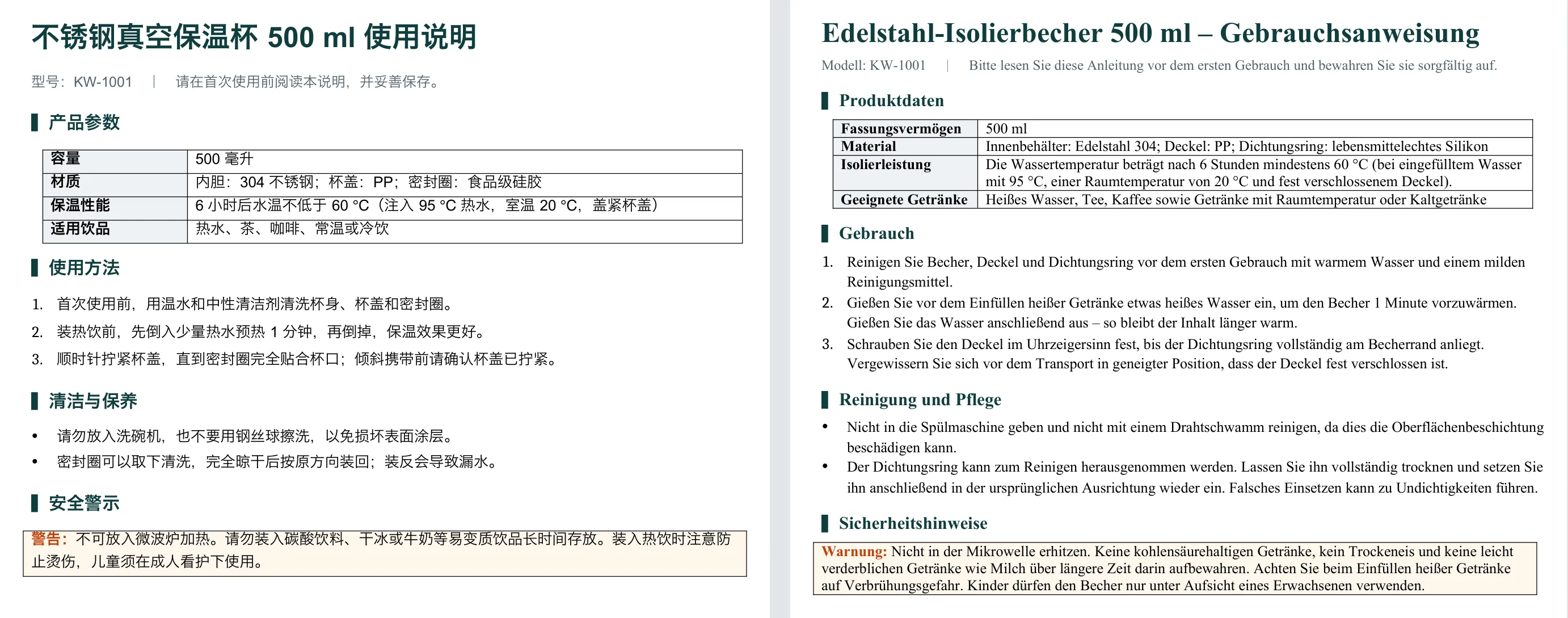
After uploading the original file to Equalang Document Translation and selecting German as the target language, the resulting document maintains high layout fidelity:
- Beige warning callout stays intact: The thin right-angled borders and soft beige fill remain completely preserved. The translated text remains neatly contained inside the box without clipping or line overflow.
- Neat paragraph shading layout: Despite the significant length increase typical of German technical warnings, the font changes from Arial to Times New Roman, and the text flows naturally within the paragraph shading without crowding adjacent body copy.
- Structured specification tables: Technical specifications—such as thermal performance (Isolierleistung) and material grades (Material: Edelstahl 304)—remain aligned with crisp, unbroken cell borders.
4. Compliance R&D: Reading EU Regulations Efficiently with a Browser Extension
Building hardware for international distribution involves more than formatting product manuals—it requires staying aligned with regional compliance frameworks, such as CE marking requirements and the EU General Product Safety Regulation (GPSR). For compliance engineers navigating lengthy legal directives on official EU portals, parsing multi-page technical directives can be time-consuming.
Using the bilingual reading mode in the Equalang browser extension, compliance and regulatory teams can review source directives directly on official websites:
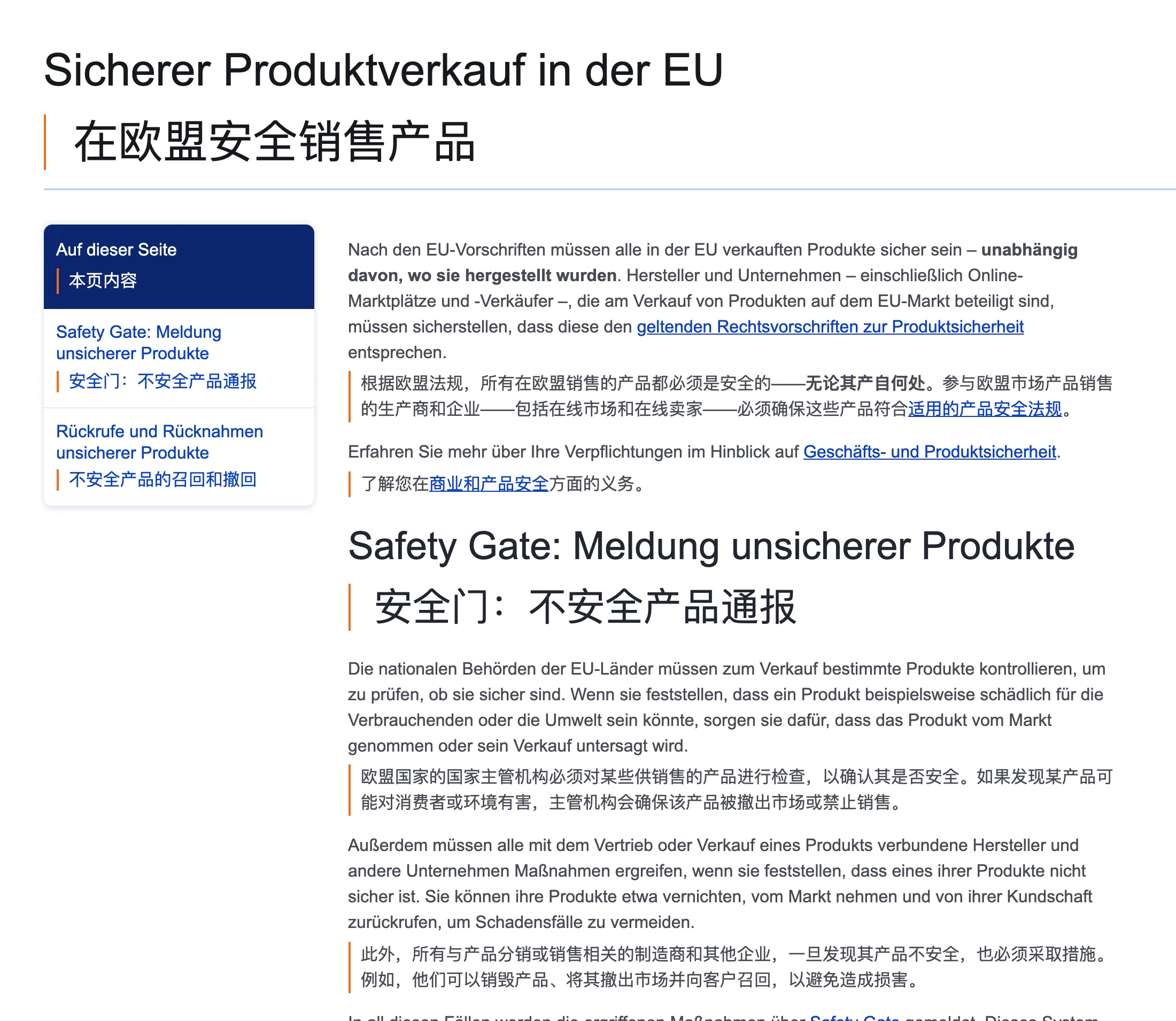
- Inline bilingual paragraphs: Translations appear directly underneath the original legal clauses, eliminating the friction of switching back and forth between browser tabs.
- Preserved legal citations: Directive reference numbers, cross-links, and annex references remain fully clickable, making it straightforward to trace statutory sources.
5. Compliance Checklist for International Product Manuals
Before sending user manuals to final print production, hardware project teams should verify the following compliance details:
- Standardized signal word hierarchy: Verify whether the target market mandates specific hazard severity levels (such as the distinct usage of DANGER, WARNING, and CAUTION under ANSI Z535 and ISO 3864), ensuring the signal word accurately reflects the level of risk.
- Measurement units and electrical ratings: When exporting to North America, verify imperial conversions alongside metric measurements (e.g., fluid ounces, inches, Fahrenheit vs. ml, cm, Celsius). For European shipments, verify that plug types and rated voltage/frequency specifications match local infrastructure.
- Mandatory certification marks and responsible entities: Ensure that compliance marks at the back of the manual—including CE, RoHS, the WEEE crossed-out wheeled bin symbol, and the EU Authorized Representative (EC REP) contact details—are accurate and legible before authorizing print plate production.
Sources & Attribution
- Equalang Document Translation Portal
- Equalang Browser Extension Overview
- European Commission: General Product Safety Regulation (GPSR) Official Guidance
- ISO 3864-2: Graphical symbols — Safety colours and safety signs — Part 2: Design principles for product safety labels
- ANSI Z535.4: Product Safety Signs and Labels Standard