Tired of Full-Page Translation Breaking Tech News? Skim Hacker News and TechCrunch in Bilingual Mode
 Equalang
In brief
Break down the common pitfalls of full-page machine translation on tech blogs like Hacker News and TechCrunch, and explore paragraph-by-paragraph bilingual reading that preserves code terms and links.
Keywords: bilingual tech news reading, Hacker News translation, TechCrunch webpage translation, bilingual webpage extension, select to translate extension

For developers, product managers, and technology investors tracking the pace of innovation, spending half an hour every day scanning Hacker News, TechCrunch, Ars Technica, or The Verge is an indispensable ritual for catching primary sources across the global industry.
Yet plowing through dense, multi-page technical analyses in a second language can quickly induce cognitive fatigue by the third article. Reaching for your browser's default full-page machine translation often introduces an even bigger headache: specialized technical terminology gets clumsily over-translated (turning standard terms like Prompt Injection, Token, or Pull Request into confusing literal phrases), formatting collapses, and in-text hyperlinks drift out of alignment. Even more frustrating, full-page replacement obscures the original English prose entirely, forcing you to repeatedly toggle translation on and off just to verify an ambiguous technical claim.
Staying on top of global tech developments does not require straining through a dictionary word by word, nor does it mean enduring broken full-page translations. The practical solution is an approach combining paragraph-level bilingual alignment with instant floating lookups, letting you absorb key takeaways rapidly while keeping original technical terms and reference links intact.
1. Why Full-Page Machine Translation Breaks Tech News
When reading overseas technology journalism and in-depth engineering blogs, standard machine translation tools consistently stumble across three major areas:
- Aggressive over-translation of specialized jargon: Across artificial intelligence, cloud infrastructure, and open-source software, terms like
LLM,Kubernetes,Zero-shot, andContext Windoware widely recognized and used in their original English form. Generic translation engines often lack technical context, forcing literal translations that obscure the intended meaning. - Corrupted layouts and broken technical hyperlinks: Tech journalism and architecture breakdowns are densely interspersed with GitHub repositories, arXiv citations, and external references. Many translation extensions disrupt the DOM structure during re-rendering, causing links to break, misalign, or vanish altogether.
- High verification friction with single-language replacement: When an entire webpage is overwritten, readers lose direct line-of-sight to the source material. If a translated sentence feels awkward or ambiguous, you have to turn off translation, locate your place in the original text, verify the wording, and turn translation back on—completely shattering your reading flow.
2. Paragraph-Level Bilingual Alignment: An Immersive Skimming Workflow
To bypass these friction points, you can adopt a paragraph-level bilingual reading workflow powered by a browser extension. Below, we demonstrate how to skim foreign-language tech articles smoothly using the Equalang browser extension developed by our team.
1. Enable Bilingual Mode for Smooth, Screen-by-Screen Reading
After installing and opening the extension panel in Chrome, Edge, or Firefox, set your target language and toggle on the "Bilingual Mode" option.
When you open a Cloudflare blog post, the translated text appears directly beneath each corresponding original paragraph, rendering screen by screen as you scroll down:
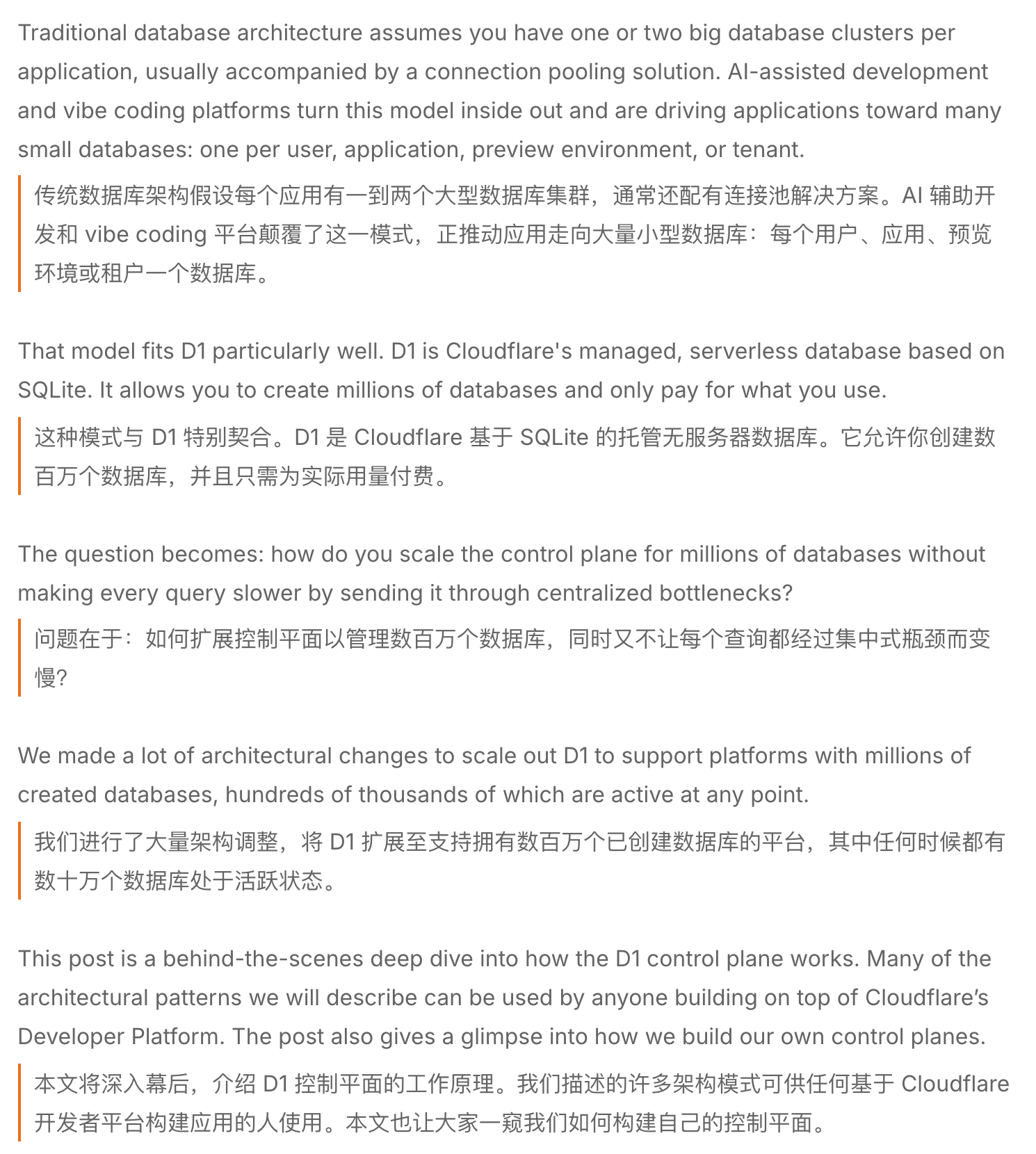
In real-world testing, paragraph-by-paragraph bilingual layout provides several distinct advantages:
- Effortless verification without switching tabs: Glancing at the translated text lets you capture the paragraph's core point in seconds, while simply raising your eyes a single line lets you cross-check critical architecture definitions against the original phrasing.
- Hyperlinks preserved in place: In-text references, code repository links, and research citations stay fully functional, allowing you to jump directly to referenced open-source projects or source papers with a single click.
- One-click restoration: If you prefer reading only the clean original page, toggling the extension switch restores the native webpage instantly.
2. Unfamiliar Term? Look Up Translations with a Floating Card
Beyond skimming full articles, reading bleeding-edge architecture teardowns occasionally surfaces unfamiliar compound words or emerging jargon. Instead of interrupting your reading flow to copy, open a new tab, and search, the extension provides a built-in selection lookup:
After enabling "Selection Translation" in the extension popup, highlight any word or phrase with your mouse and click the floating translation icon. A lightweight card immediately pops up with the translation directly on the current page:
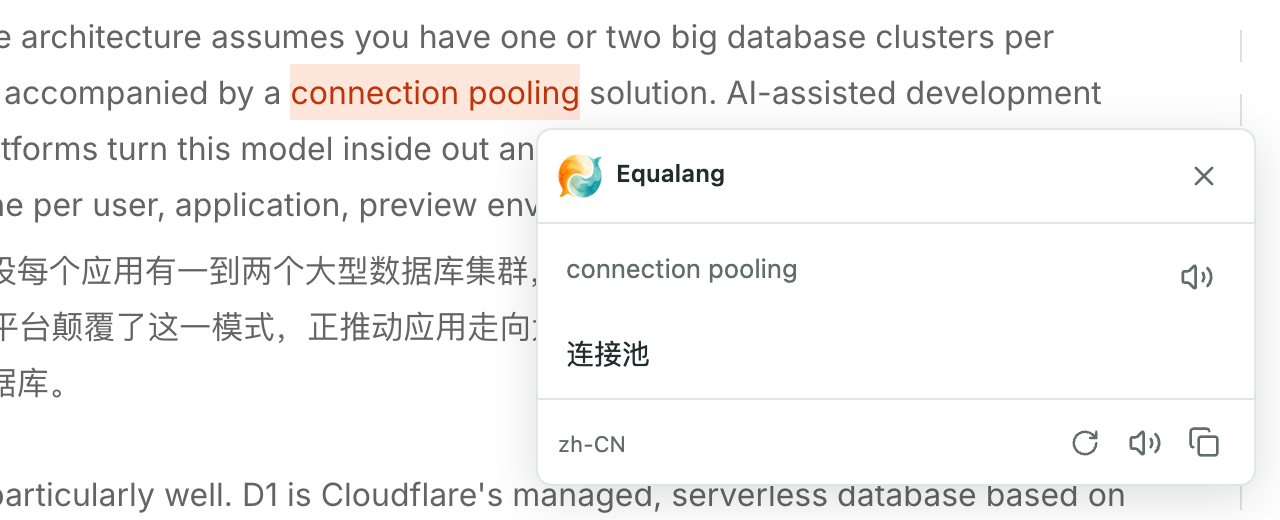
The floating card displays the selected text and translation right within your current viewport. It features a close button in the top-right corner, without interrupting your reading rhythm.
3. Objective Comparison of Tech News Reading Methods
To help you choose the right approach for your daily technical reading, here is an overview of common reading methods and their trade-offs:
4. Practical Tips for Reading Tech News Efficiently
- Skim translations first, verify key sentences in the source: When speed-reading with bilingual mode, use the translated paragraphs to filter out background context quickly. When you reach conclusions or core architecture descriptions, glance back at the original sentences to absorb the precise nuances.
- Permissions for local technical PDFs: If you frequently download engineering whitepapers or offline PDFs and open them in your browser, make sure to enable "Allow access to file URLs" for the extension in your browser's extension manager (e.g.,
chrome://extensions). Standard web browsing requires no additional permissions. - Build a daily 20-minute reading habit: Set aside a fixed 20 minutes each day to browse top tech feeds. Pairing paragraph-level bilingual alignment with instant term lookups reduces mental friction, making it easy to stay consistently attuned to global technology developments.