Foreign Buyers at Your Trade Show Booth? Place Your Phone on the Table for Equalang Face-to-Face Translation
 Equalang
In brief
Struggling to communicate when international buyers walk up to your booth? Lay a phone flat on the table with 180° opposing split-screen translation so both sides can converse naturally in their native languages.
Keywords: trade show translation, face-to-face translation, 180-degree split screen, Canton Fair foreign trade, booth interpreter app
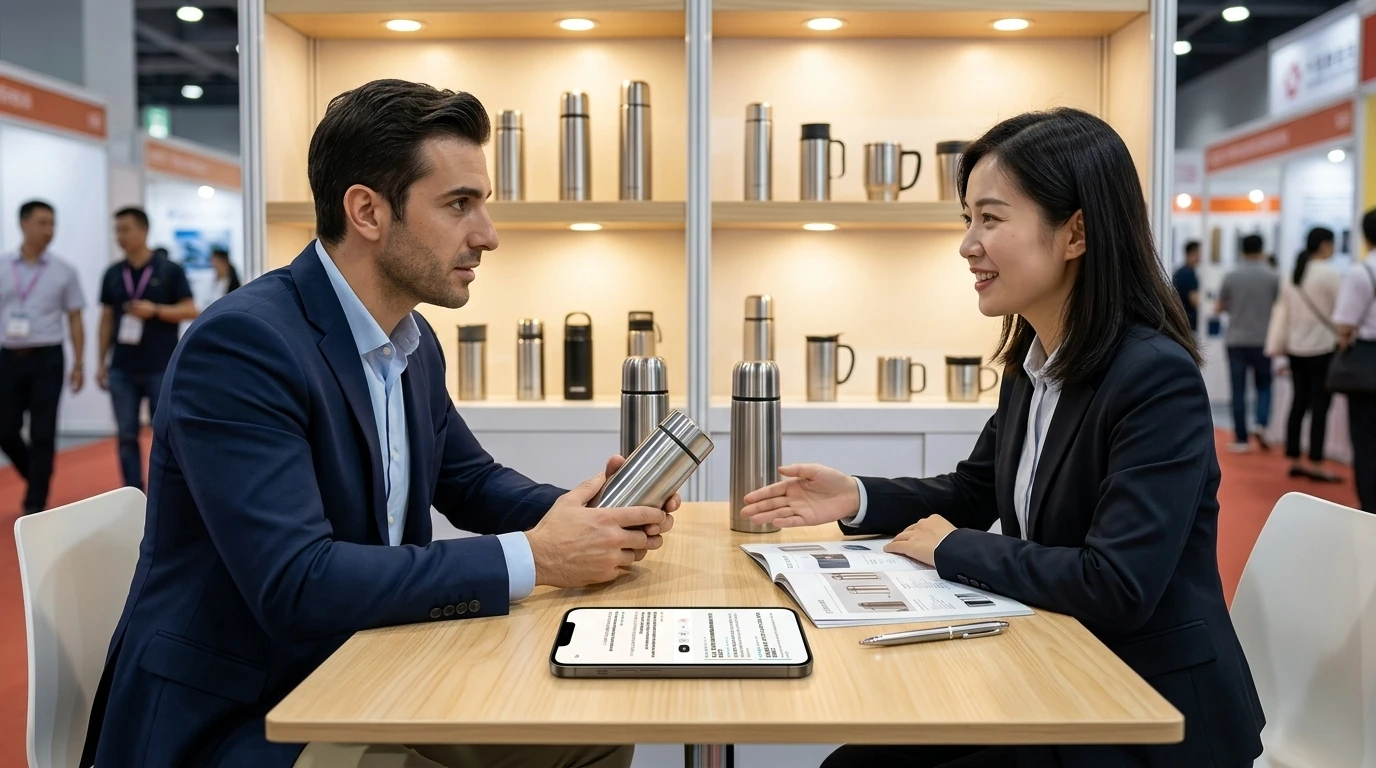
At major international expos—from the Canton Fair and the China International Import Expo (CIIE) to global trade shows in Dubai and Hannover—sales representatives frequently encounter the same high-pressure moment:
The aisles are packed with visitors when a prospective buyer from Europe or the Middle East pauses at your booth. They pick up a sample from the table, inspect the finish, and immediately launch into rapid-fire inquiries: "What's your minimum order quantity for custom branding? Can you meet CE compliance by next quarter?"
Caught off guard, if the sales representative reaches for a traditional handheld translator or standard translation app, the interaction quickly becomes awkward and clumsy. The representative has to tap and hold an onscreen button, speak their phrase in Chinese, wait for the mechanical English playback, and then gingerly extend the device toward the buyer while gesturing for them to speak. Most buyers feel uncomfortable talking inches from someone else's personal phone, and passing the device back and forth breaks the conversational rhythm. Add in the loud hum of exhibition hall noise or unfamiliar accents, and frequent recognition errors derail what should be a smooth commercial exchange. Deals potentially worth hundreds of thousands of dollars often slip away in that hesitant back-and-forth.
In fast-paced trade negotiations, effective communication should never depend on passing hardware across a counter. Instead, the most practical approach is laying a single smartphone flat in the center of the table, switching to a 180° opposing split screen, and letting both sides read real-time dialogue in their native language on a shared display.
1. Why Passing Devices Back and Forth Ruins Booth Negotiations
In commercial trade discussions, traditional translation hardware and handheld voice apps present several obvious drawbacks:
- Disrupting business etiquette and eye contact: Professional business negotiations depend heavily on direct eye contact, subtle body language, and micro-expressions. When both parties are constantly looking down to adjust phone screens or locate recording buttons, conversational momentum and professional credibility suffer significantly.
- Occupying hands needed for product demos: Introducing technical specifications, demonstrating sample mechanisms, or flipping through a physical product catalog requires both hands. If one hand is permanently tied up gripping a translation device, presenting products becomes clumsy and constrained.
- Excessive confirmation friction from ambient noise and accents: Exhibition halls are filled with crowd chatter and loudspeaker announcements. One-way audio readouts are easily drowned out by background noise. Without real-time, large-text transcription on screen, verifying crucial commercial numbers—such as lead times, sample fees, and MOQs—becomes tedious and error-prone.
A tool built for trade show booths must achieve zero physical friction: once placed on the table, it should act like a digital conference plaque, letting both sides speak naturally while viewing simultaneous two-way transcriptions.
2. Core Requirements for Seamless Face-to-Face Booth Communication
To deliver natural, hands-free interpretation on a busy exhibition table, an effective solution must meet three design requirements:
- 180° Inverted Opposing Split Screen: When the phone rests flat between two people, the top half of the screen facing the buyer must be physically inverted 180 degrees. This allows the buyer to look down and read translations from their perspective, while the lower half stays oriented toward the sales rep—enabling effortless reading without turning the device.
- Zero Installs and No Hardware Pairing: The buyer should never have to take out their phone, scan QR codes, or download a proprietary app. Nor should there be any requirement to pair dedicated Bluetooth earbuds or walkie-talkie accessories. Any standard smartphone should launch the session instantly through a mobile browser.
- Large-Text Display with Complete Transcript Export: Text must be formatted in a clean, high-contrast large font that remains legible from a couple of feet away. Once the meeting concludes, the full bilingual conversation transcript can be exported with one click, providing an accurate record when drafting formal Proforma Invoices (PI) and following up on custom requirements.
3. Three Steps to Manage Booth Visits with Equalang Face-to-Face Translation
To solve the challenges of trade expos, foreign client receptions, and commercial meetings, our team designed Equalang Face-to-Face Translation, optimized specifically for tabletop use.
Without downloading apps or installation packages, you can set it up in your mobile browser in three simple steps:
Step 1: Open Face-to-Face Translation in Your Mobile Browser
Visit Equalang Face-to-Face Translation using the default browser on your smartphone or tablet.
Once loaded, select the language pair for the conversation (for example, choose Chinese on your side, and English, Spanish, Arabic, or Russian on the buyer's side).
Step 2: Select "Facing" Mode and Lay the Device Flat on the Table
Switch the screen layout to Facing mode.
The upper half of the display immediately inverts 180° into the buyer's language interface, while the lower half stays oriented toward you. Place the phone flat in the center of the table near your product display, positioning the microphones between both speakers.
Step 3: Speak Naturally While Reading Inverted Large-Text Transcripts
Neither party needs to tap or fight over a recording button; simply converse as you normally would.
The system captures voice input and translates continuously, streaming real-time text to each person's respective screen area:
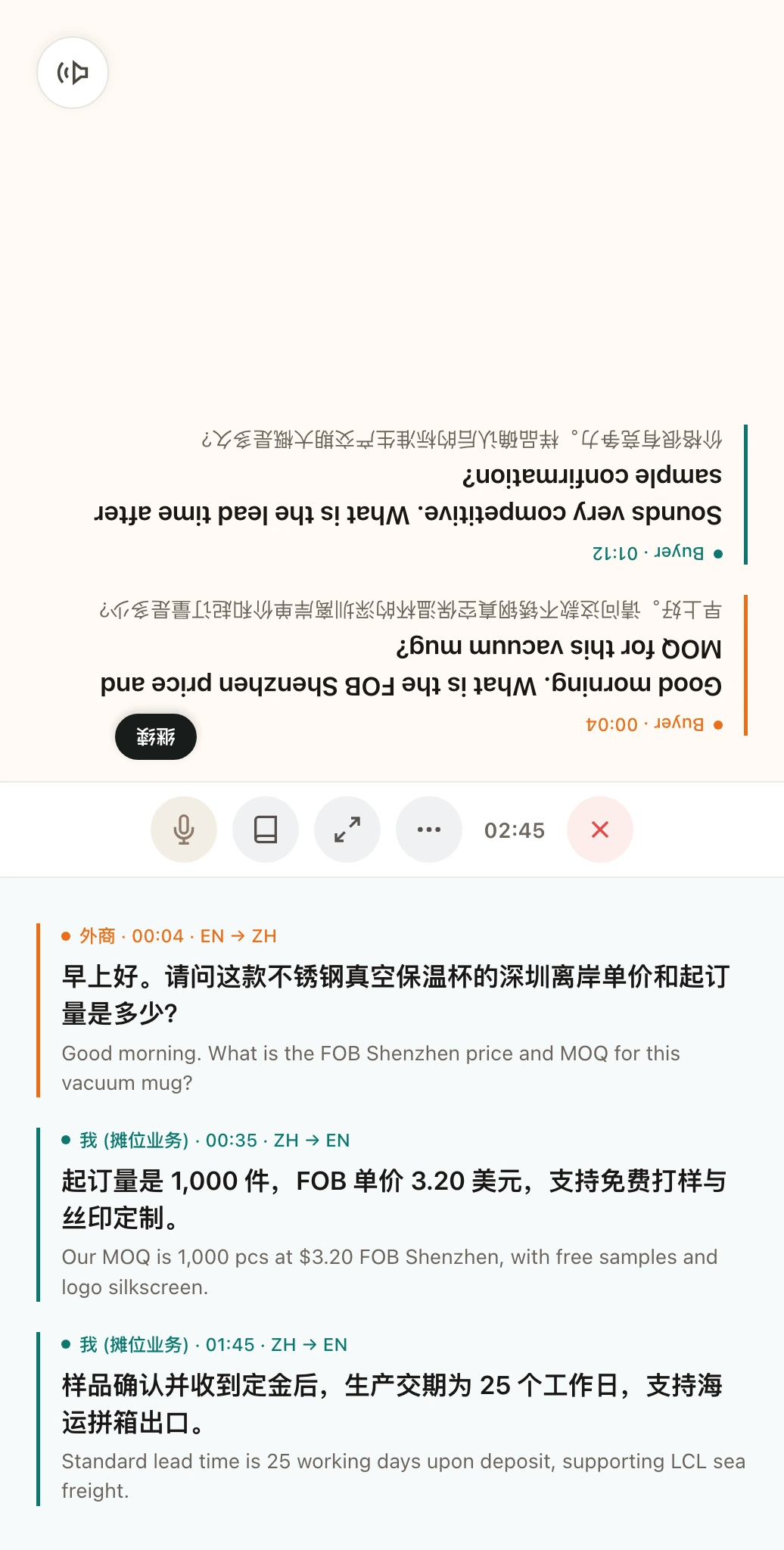
As shown in the illustrative diagram above, the upper screen faces the visiting buyer, clearly displaying foreign-language text in large print; the lower screen faces the sales representative with corresponding Chinese translations. The sales rep keeps their hands free to present samples and mark pricing sheets, maintaining an effortless conversational rhythm.
4. Four Practical Tips for Booth Conversations
On a noisy exhibition floor, observing a few practical habits will make your face-to-face translation sessions even smoother:
- Double-check key specifications and numbers: For crucial commercial terms such as FOB or CIF unit pricing, MOQs, and ports of departure, complement speech playback by pointing to the numbers displayed on screen. Visual confirmation ensures both parties stay strictly on the same page.
- Angle or elevate the phone on the table: Resting the phone on a closed catalog or an angled display stand provides a more comfortable viewing angle, reducing neck strain when glancing at the text over prolonged discussions.
- Maintain a steady pace with concise phrasing: In loud convention halls, opt for direct, clear business phrasing (for example: "We can support 500 units for sample testing"). Avoiding convoluted clauses or idiomatic slang helps speech recognition deliver crisp, immediate translations.
- Export bilingual meeting minutes after each visitor leaves: Meeting dozens of prospective buyers a day makes it easy to confuse customized requests. As soon as a client steps away, tap Export Transcript to save the conversation to your notes. When following up via email or reviewing leads that evening, you will have an accurate, firsthand record of their exact requirements.
By moving past the awkward back-and-forth of handheld gadgets, placing a single phone on the table creates a professional, composed bridge for international negotiations. In a busy trade show booth, keep your full attention on your clients and products—and negotiate your next deal with confidence.
Sources
- Equalang Face-to-Face Translation: https://equalang.com/face-to-face
- China Import and Export Fair (Canton Fair) – Official International Business Guide: https://www.cantonfair.org.cn/
- International Chamber of Commerce (ICC) – Incoterms Rules: https://iccwbo.org/business-solutions/incoterms-rules/