Translate Chinese Excel Quotes While Keeping Formulas Intact
 Equalang
In brief
Learn how to translate Chinese Excel quotes into English while preserving numbers and formula text, so you can understand items and keep editing quantities.
Keywords: Excel translation; translate quotes; preserve formulas; spreadsheet translation; keep formatting
If you source products from overseas, you might regularly receive Excel quotation sheets entirely in Chinese. To understand the exact specifications and product names, you not only need to translate the text, but you also want to be able to adjust order quantities and check the total price afterward. This requires a translation tool that does not break the original calculation logic.
With Equalang's document translation, you can translate entire .xlsx files seamlessly. It fits naturally into your quotation workflow and offers three practical benefits:
- Duplicates cost once: Text that repeats across the spreadsheet is only translated once, saving on your usage.
- Rich text is retained: Bold text, colors, and line breaks within cells are preserved after translation, keeping important details highlighted.
- Numbers and formulas are untouched: Pure numbers and formula texts bypass the translation process and are written back exactly as they were, making it possible for the spreadsheet to continue calculating.
Continue editing on the translated sheet
Let's look at an example of a quotation containing four products translated from Chinese into English. The original sheet includes SKUs, 4 Chinese product names, quantities, unit prices, and formulas calculating the amounts.
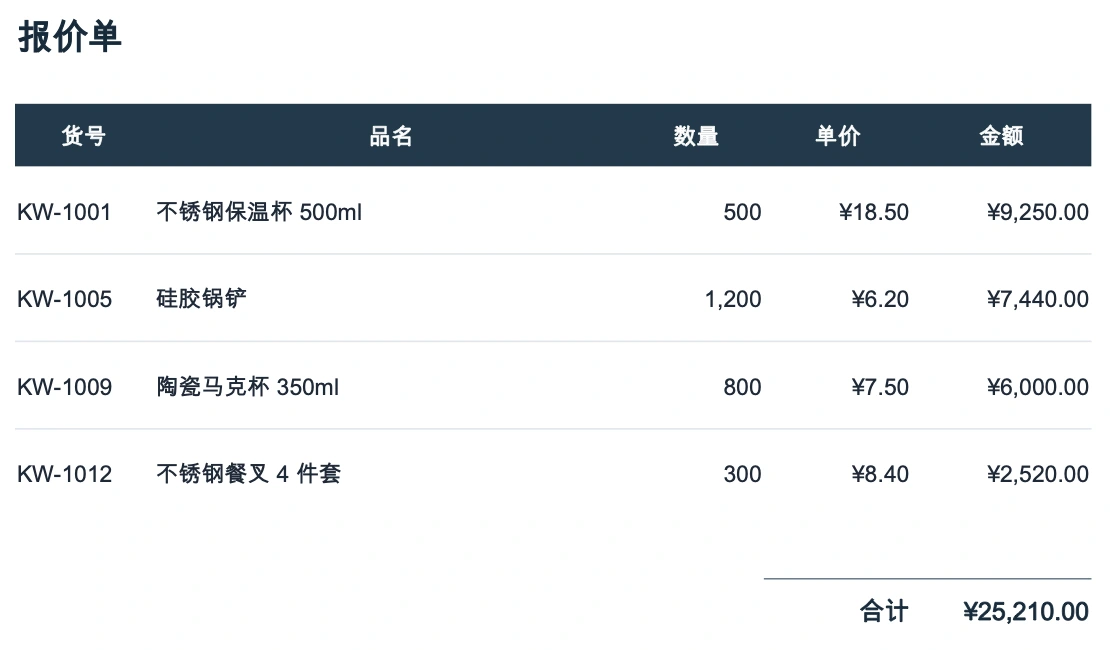
After uploading it to Equalang, we downloaded the translated English Excel spreadsheet:
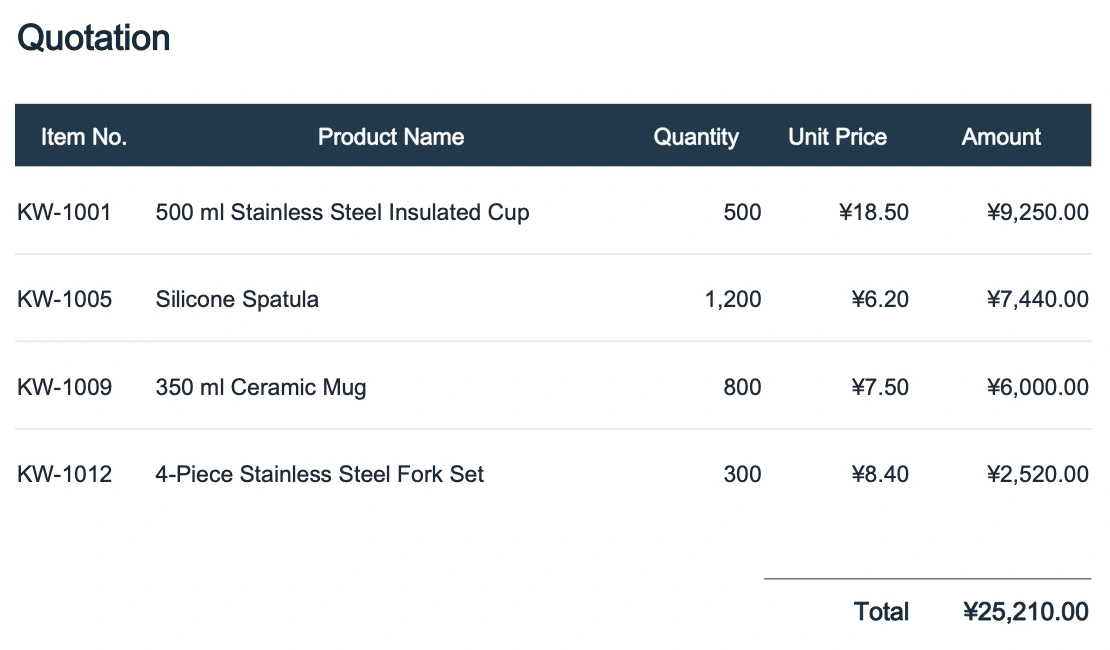
In this downloaded sheet, the product details are immediately clear (for example, 不锈钢保温杯 500ml is now 500 ml Stainless Steel Insulated Cup, and 硅胶锅铲 is Silicone Spatula), but more importantly, it remains a working tool.
Because the translation preserved the 8 number inputs and 5 math formulas, the bottom total accurately displays 25210. When you adjust the order to your actual needs—such as changing the insulated cup's quantity from 500 to 501—the row amount immediately recalculates to 9268.5, and the grand total automatically updates to 25228.5. Understanding the items is just the first step; you can directly tweak the numbers and see the new totals on the translated sheet.
A note on text-dependent rules
While preserving formula text helps with calculations, you should be mindful of complex rules that rely on specific text.
For example, if your original sheet uses a COUNTIF formula to count occurrences of the Chinese word "现货" (In stock), the formula text is preserved exactly as it was. However, since the cell text has been translated into English, the original matching condition will fail, likely dropping the count to 0. When dealing with complex sheets, always manually check that text-dependent formulas, conditional formatting, and dropdown menus still function as intended after you review the items.
Sources
- Equalang document translation supports
.xlsxfile uploads after logging in.